
It has been about a month since the release of the "system one" model, a new AI specialized in judgment and decision-making (1). In this article, I would like to explore how we can advance business process automation using this system one model. To that end, I developed an AI automation simulation app. Using this app, I will run simulations and take a concrete look at how automation can be implemented.
1. How Workflow Automation Works
First, let me briefly explain how simulations are conducted in the application I developed. Fundamentally, various cases are fed into the system one model to make judgments and decisions, which then determine the downstream actions. However, for judgments where the system one model lacks confidence, the task is routed to an LLM (Large Language Model) to ensure a more careful decision.
The screen below shows the application's GUI. On the left, there are selection buttons for the system one model and the LLM. When the confidence score of the system one model is low, the decision is delegated to the LLM, and you can adjust the threshold for this using a slider. For this simulation, I set it to 0.95. Furthermore, you can input the actual workflow to be automated in natural language into the box on the right. Here, the system one model which financial product a bank customer's complaint refers to, which department should handle it, and what subsequent actions to take. For this run, I set the number of cases to 20.
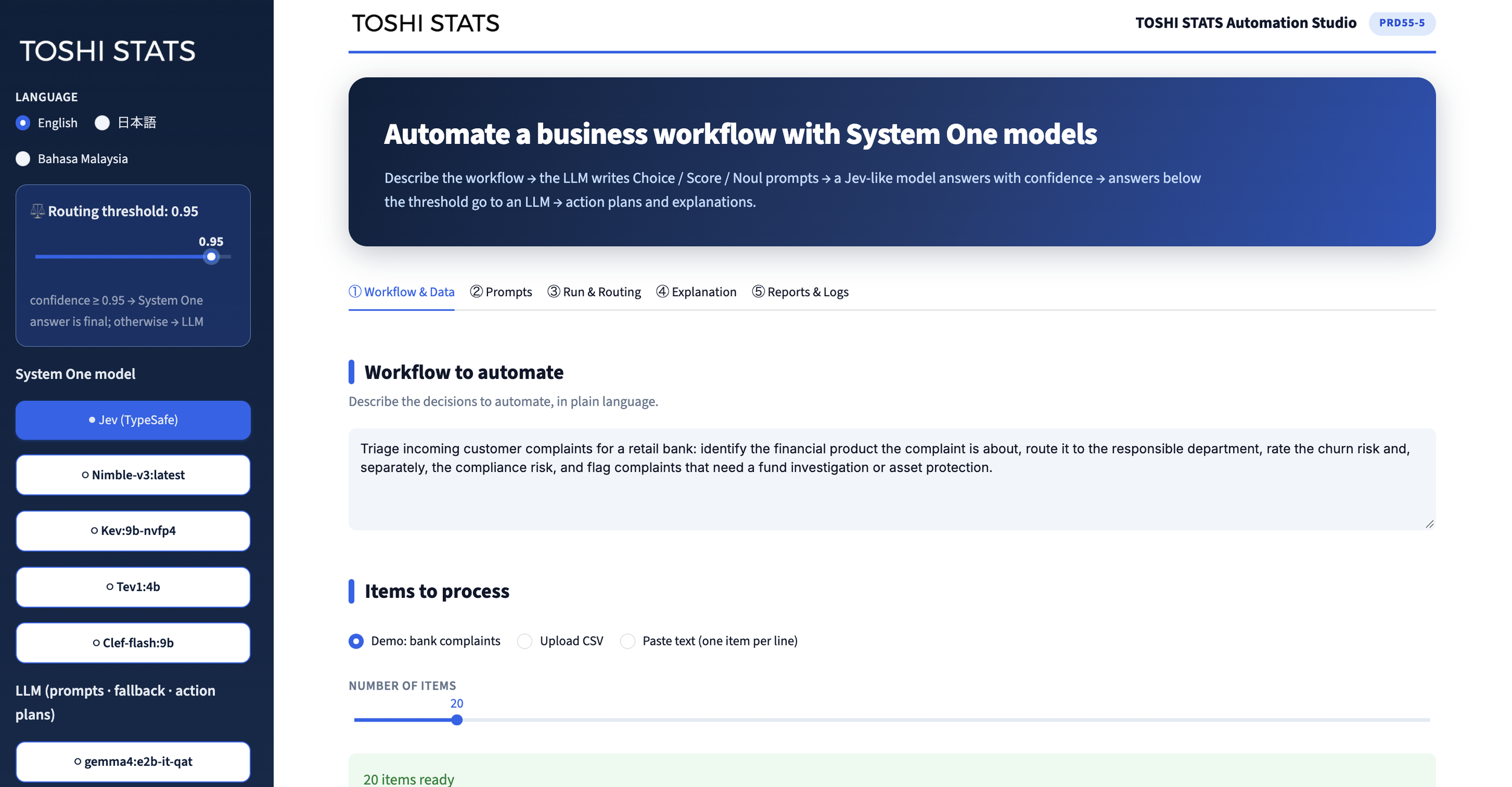
GUI of the Simulation App
You can also input specific instructions, or "prompts," for the system one model to make judgments on. This time, I used a pre-prepared demo prompt. The system one model can make three types of judgments: "Choice" (selecting from a set of candidates), "Score" (rating on a scale, such as 1 to 10), and "Noul" [Boolean/Yes-or-No] (answering Yes or No). Here, I set it to respond to the five instructions illustrated below. Since there are 20 cases and 5 instructions per case, it will respond to a total of 100 instructions.
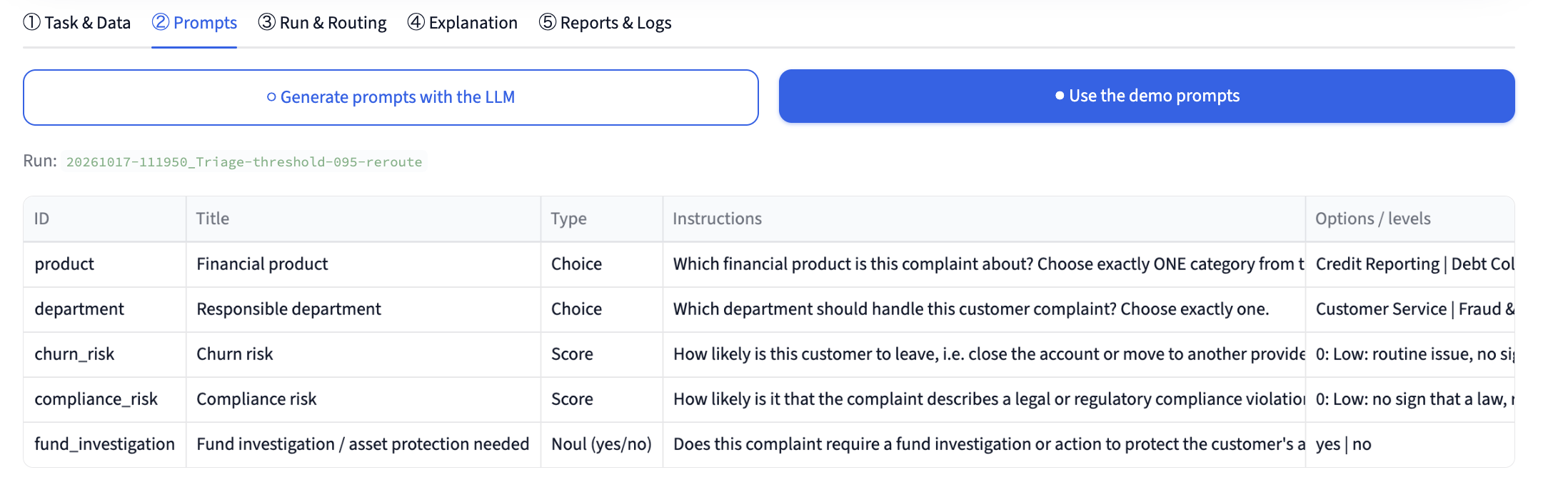
Prompts for the system one model
The overall automation flow is shown in the chart below. Pay particular attention to the branching point after the initial system one model judgment: depending on whether the confidence score exceeds the threshold, the judgment is either adopted as-is or routed to the LLM for further evaluation.
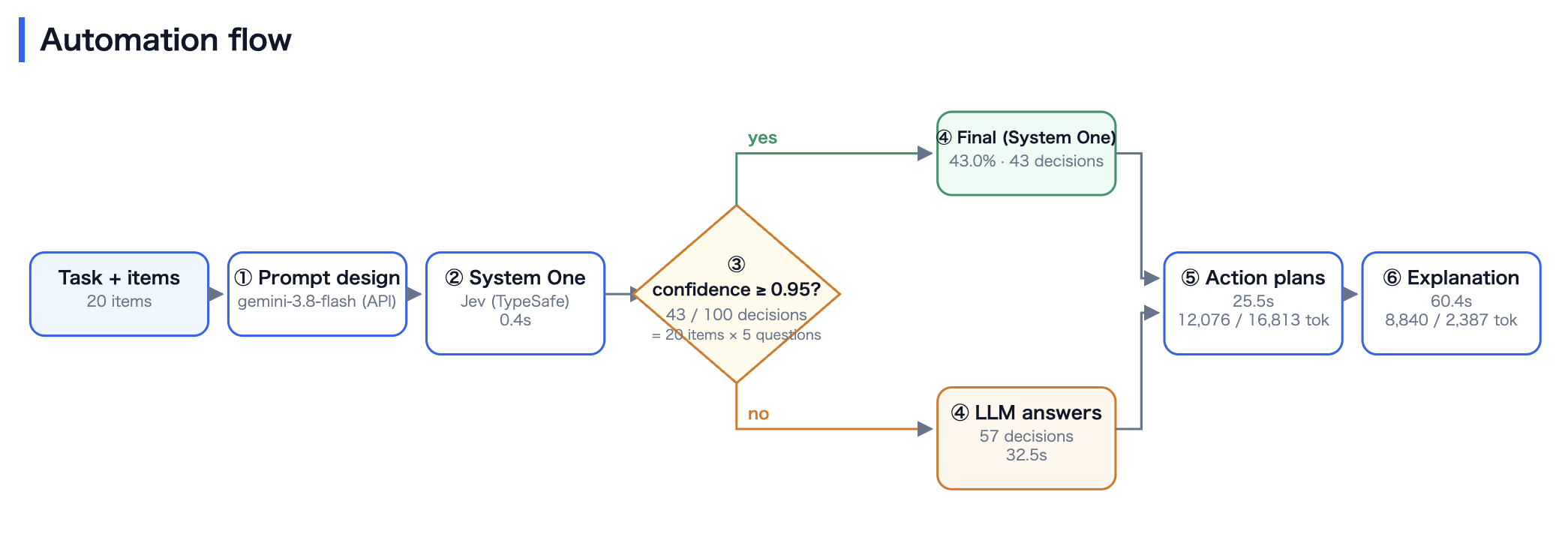
Automation Flow
2. Verification of Simulation Accuracy
In this simulation, I used "Jev" for the system one model and "Gemini 3.8 flash" for the LLM. The results showed that 43% of the total tasks were resolved solely by the system one model, while the remaining 57% were routed to the LLM. The total computation time was about 2 minutes, and the cost was approximately $0.32 USD. Since both Jev and Gemini 3.8 flash are accessed via APIs, they are paid services.
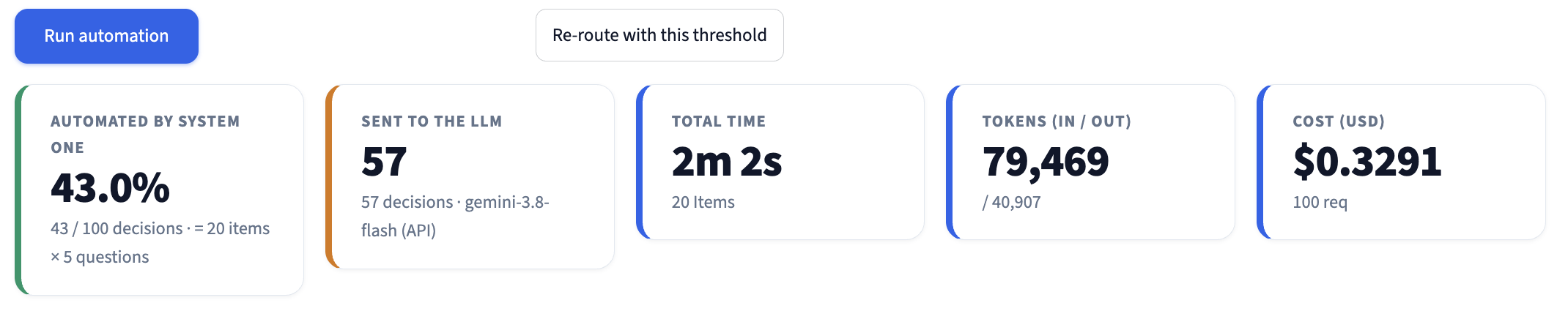
Simulation Results
Additionally, one of the instructions in this test includes ground-truth labels indicating which financial product each customer complaint pertains to, allowing us to verify accuracy. As shown below, the accuracy when judged solely by the system one model was 85%. By routing samples that fell below the threshold to the LLM to improve performance, the overall accuracy rose to 90%. Furthermore, for cases where the system one model had a confidence score of 0.95 or higher, the accuracy reached 93.8%, demonstrating that the system one model's judgments are highly accurate when its confidence is high. On the other hand, the accuracy for cases below the threshold that were delegated to the LLM was 75%, indicating that these were inherently difficult cases to judge.

Accuracy Verification
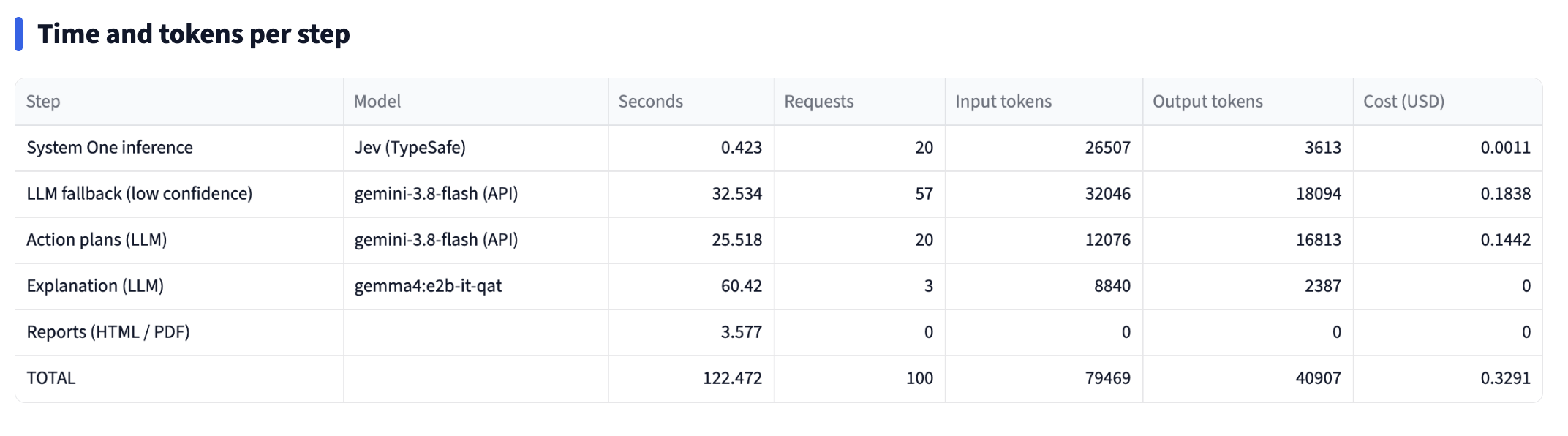
The details per step are provided here
Now, let's look at the accuracy for each category using a confusion matrix. When judged solely by the system one model on the left, "Credit Card Services" could not be identified well. However, when routed to the LLM on the right, "Credit Card Services" was correctly identified. In a confusion matrix, the diagonal elements represent correct predictions, so you can clearly see that routing to the LLM improved the accuracy.
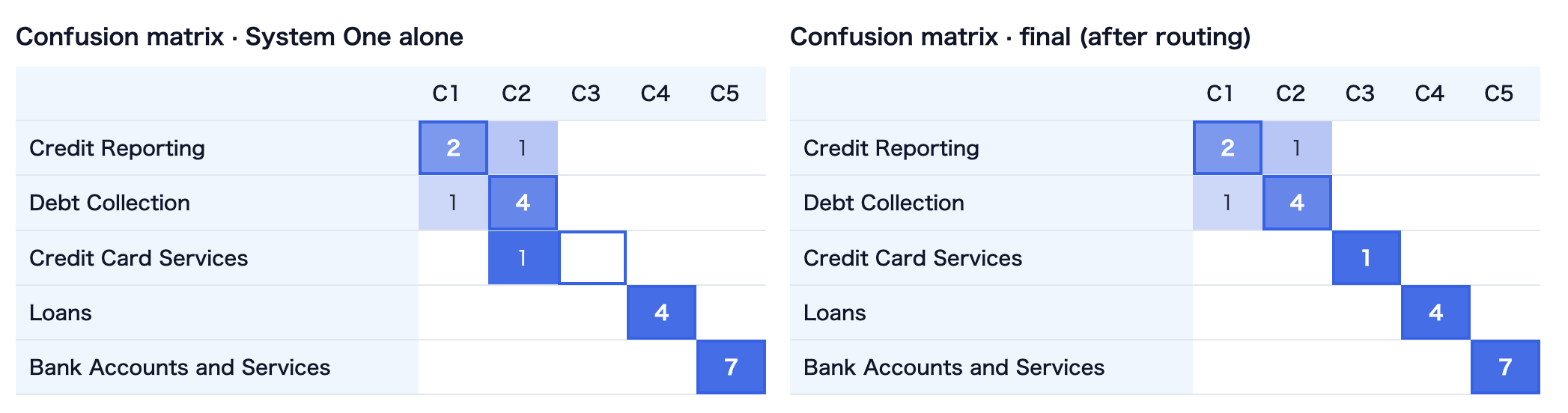
Confusion Matrix (Rows = True Categories, Columns = Predicted Categories. Diagonal elements represent correct answers)
3. Effectiveness of Workflow Automation
Ultimately, the effectiveness of workflow automation using a system one model depends on having a high proportion of high-confidence cases. The chart below shows the distribution of confidence scores for each instruction. Those in green, close to a confidence score of 1, can be considered highly accurate in their classifications. Among these, "Compliance Risk" has a distribution extending toward lower confidence scores, indicating that it was a difficult instruction for the system one model to judge. For such instructions, further refinements to the prompt will likely be needed to boost confidence scores.

Distribution of Confidence Scores
What did you think? In this test, I automated a workflow for processing bank customer complaints using Jev. Because this app is flexibly designed, you can easily swap the system one model for an open-weight model or adapt the workflow to other industries. At ToshiStats, I plan to explore and simulate various other use cases in the future. Stay tuned!
You can enjoy our video news “ToshiStats AI Weekly Review” from this link
1) Introducing System One Models & Jev, Sep 15 2026, Diogo Almeida, founder, TypeSafe
Copyright © 2026 ToshiStats Co., Ltd. All right reserved.
Notice: This is for educational purpose only. ToshiStats Co., Ltd. and I do not accept any responsibility or liability for loss or damage occasioned to any person or property through using materials, instructions, methods, algorithms or ideas contained herein, or acting or refraining from acting as a result of such use. ToshiStats Co., Ltd. and I expressly disclaim all implied warranties, including merchantability or fitness for any particular purpose. There will be no duty on ToshiStats Co., Ltd. and me to correct any errors or defects in the report, the codes and the software.