Google AI Studio

Gemini 3 Flash: The Multi-modal Powerhouse Dominating the 2026 AI Scene!

Gemini 3 Flash (1) — likely the final major AI model debut of 2025 — is currently making waves. Despite being positioned as an affordable, mid-tier model, its performance is reportedly on par with flagship models. Today, I want to put Gemini 3 Flash to the test and see just how much its multimodal capabilities have evolved. Let’s dive right in.


1. App Development

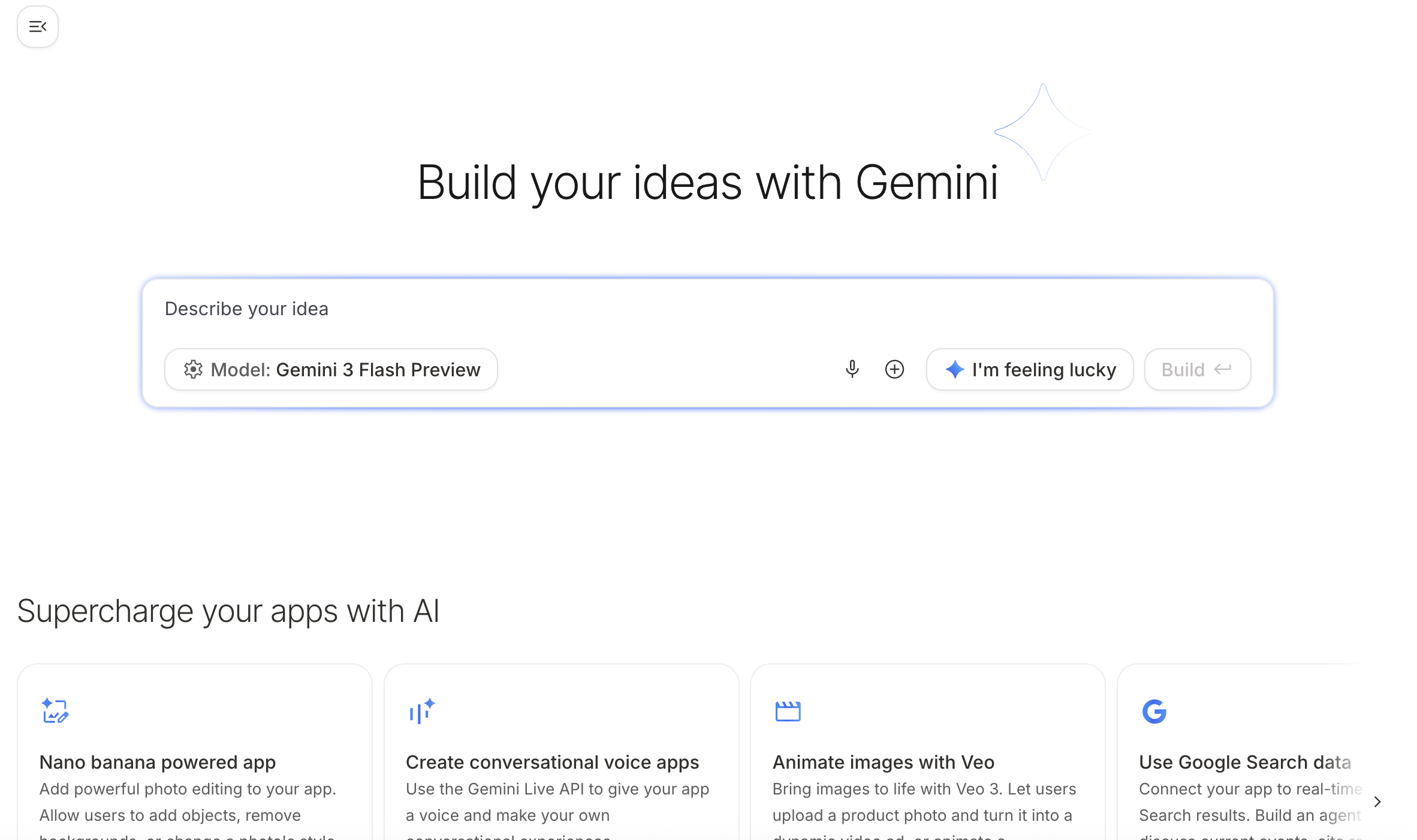
To conduct our experiments, I wanted to create a simple application using Google AI Studio. By simply entering a prompt into the interface, the app was ready in an instant. No Python was used at all. This level of accessibility means even non-engineers can build functional apps now. Things have truly become incredibly convenient.
 

2. Object Counting

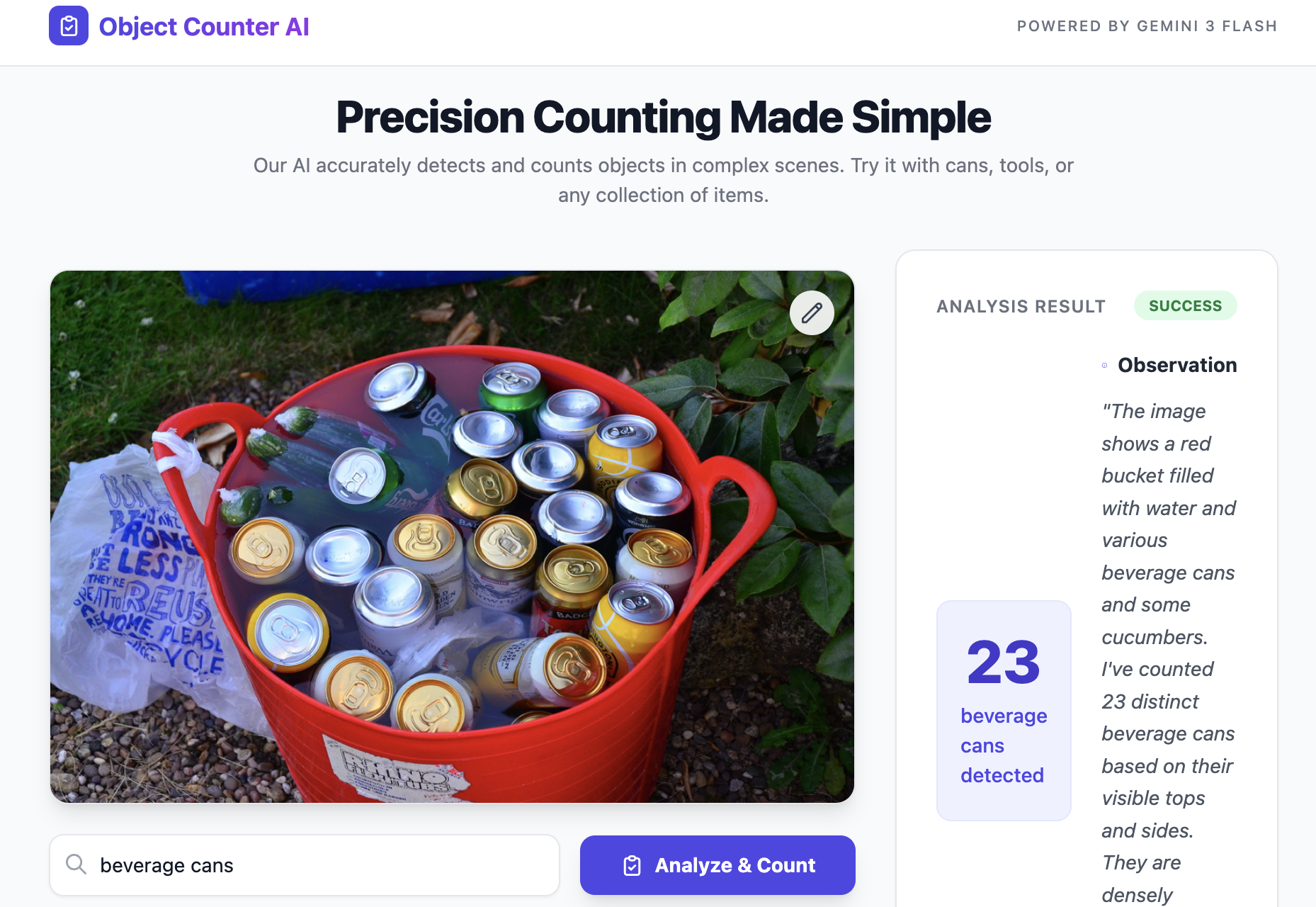
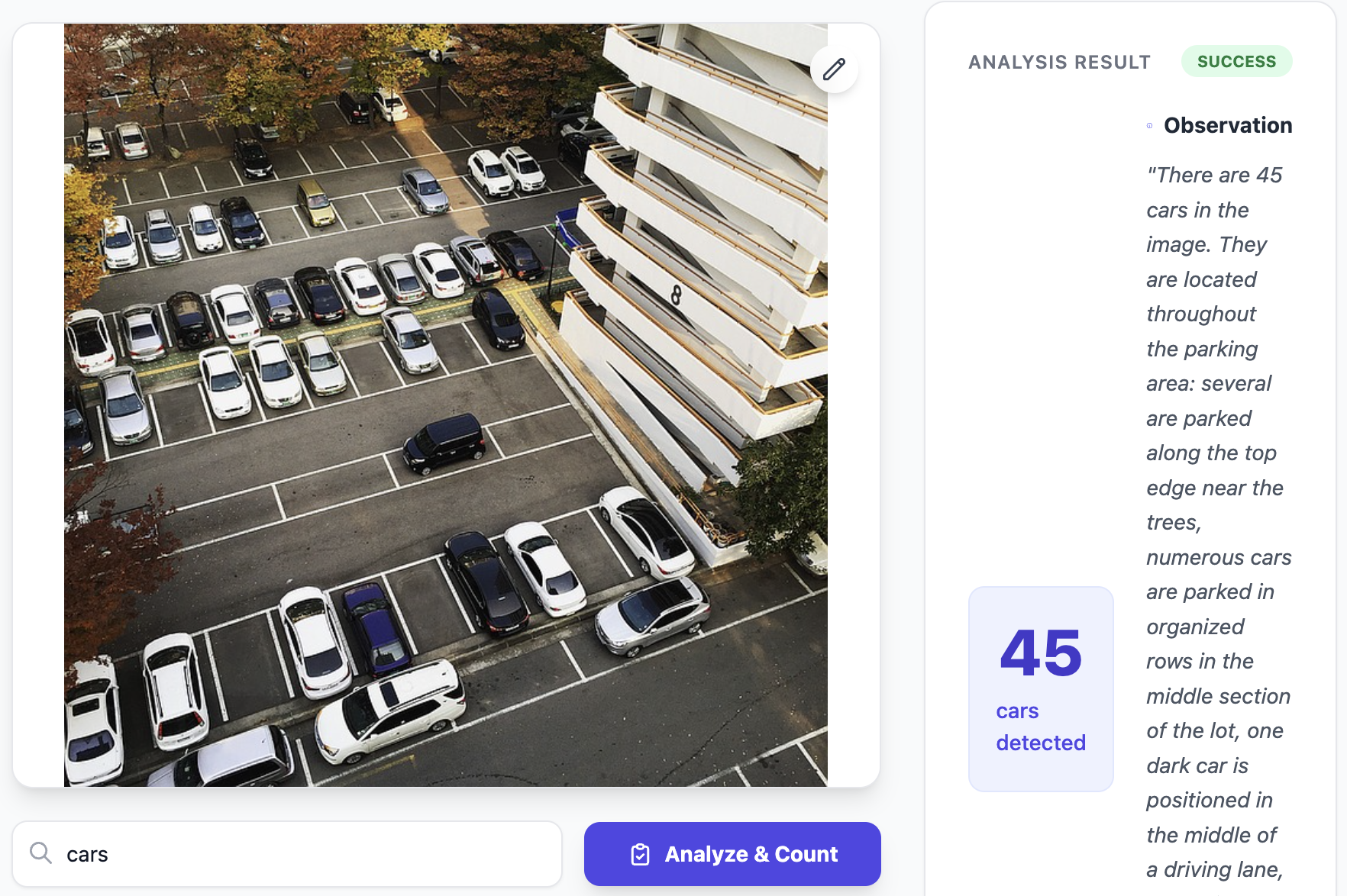
First, I challenged the model with a task that has historically been difficult for AI: counting objects. I asked the AI to count the number of cans and cars in an image. I counted them myself as well, and the AI’s response was spot on. At this level of accuracy, we might no longer need specialized object detection models for general tasks.
 

3. Economic Analysis from Charts

Next, let’s try a task that requires a higher level of intelligence: interpreting economic indicators from charts and generating an analytical report. Japan has entered a super-aging society faster than any other developed nation, and the labor force is steadily declining. For this test, I provided charts for the labor force population, unemployment rate, and Manufacturing Sector hourly wages. I then instructed the AI to read these charts, synthesize the data, and produce a comprehensive analysis.
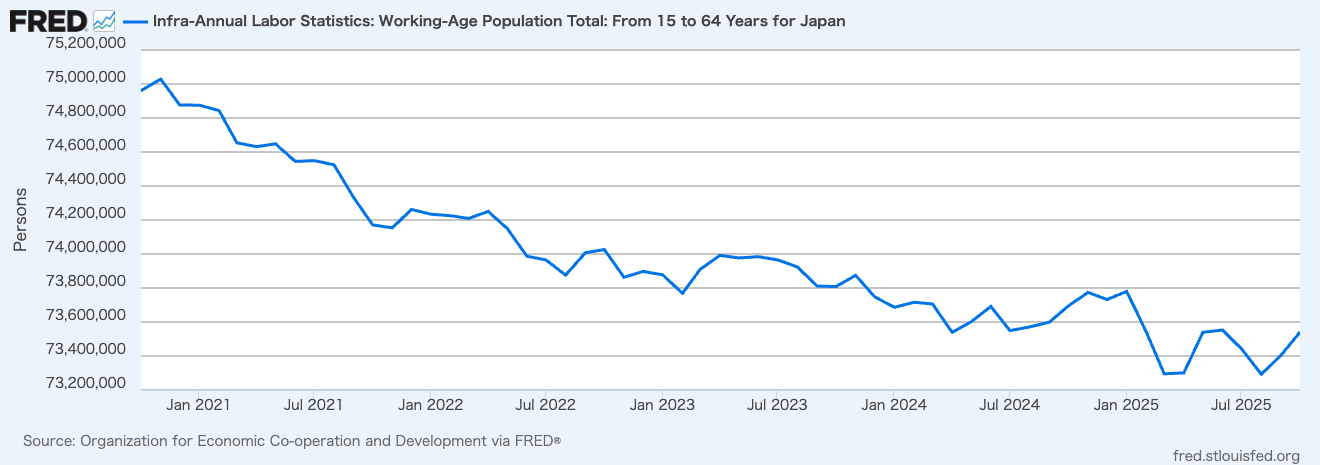
labor force population
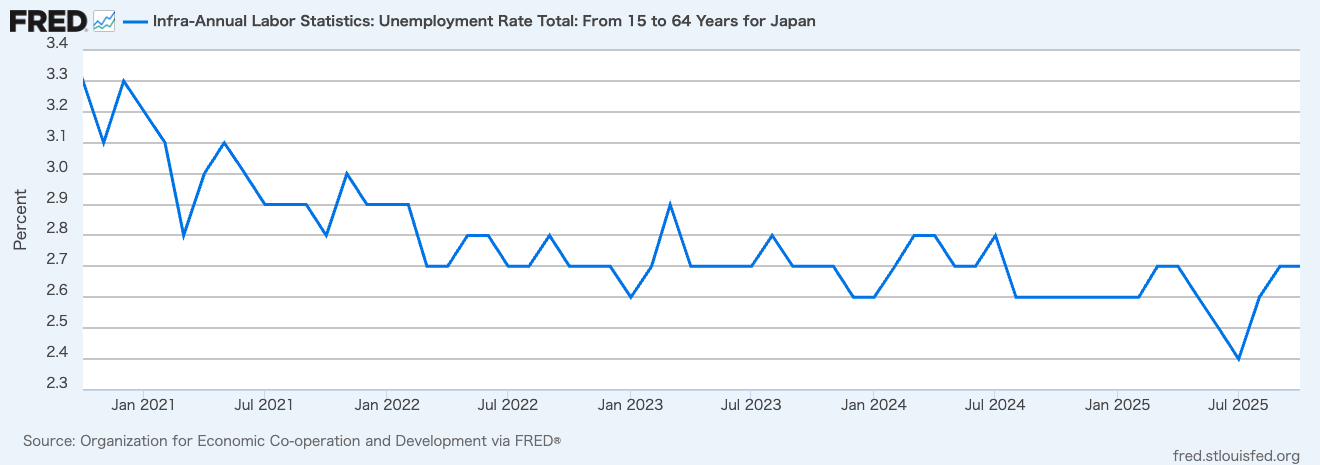
unemployment rate
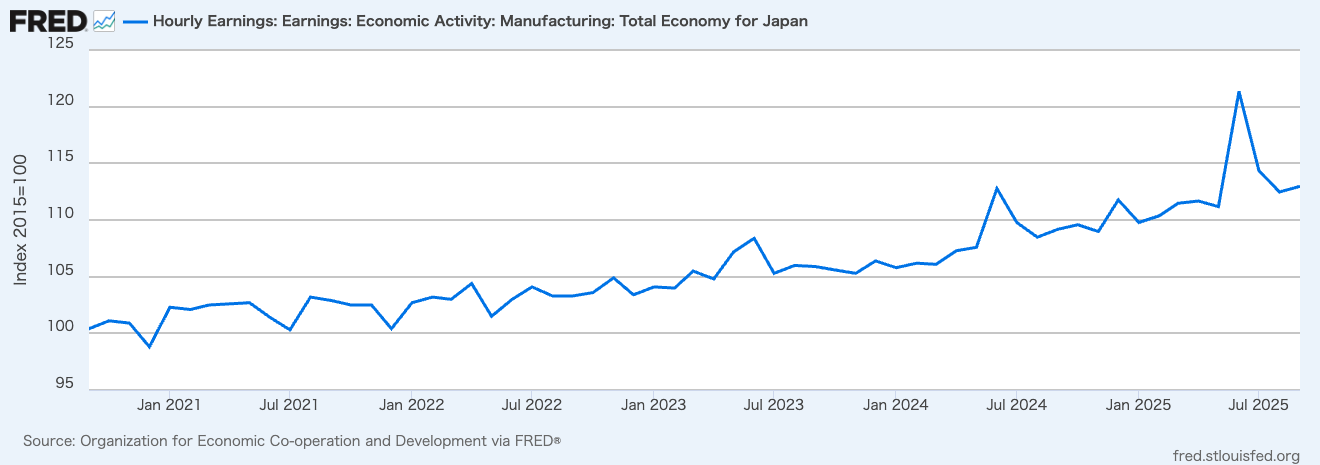
                Manufacturing Sector hourly wages

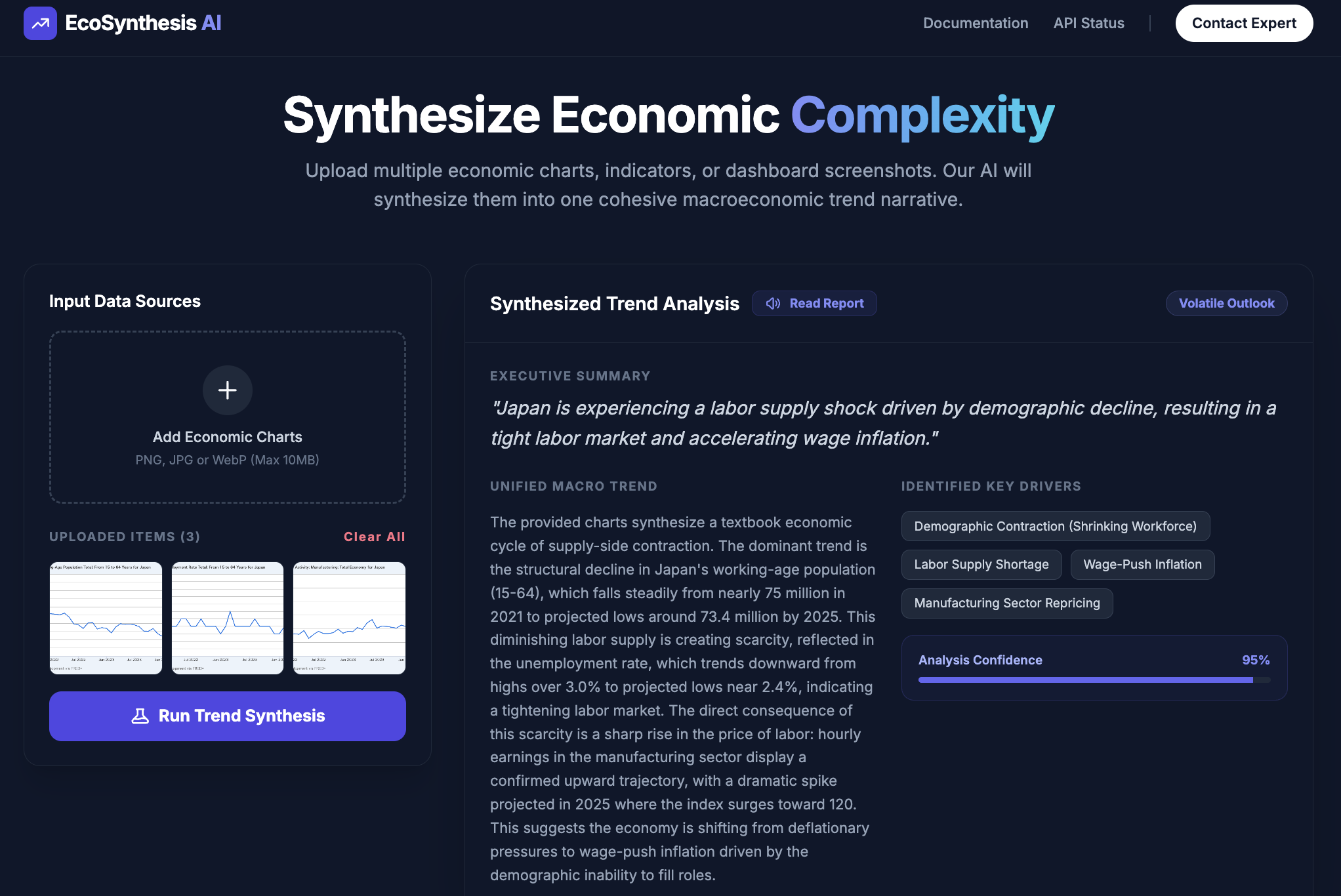
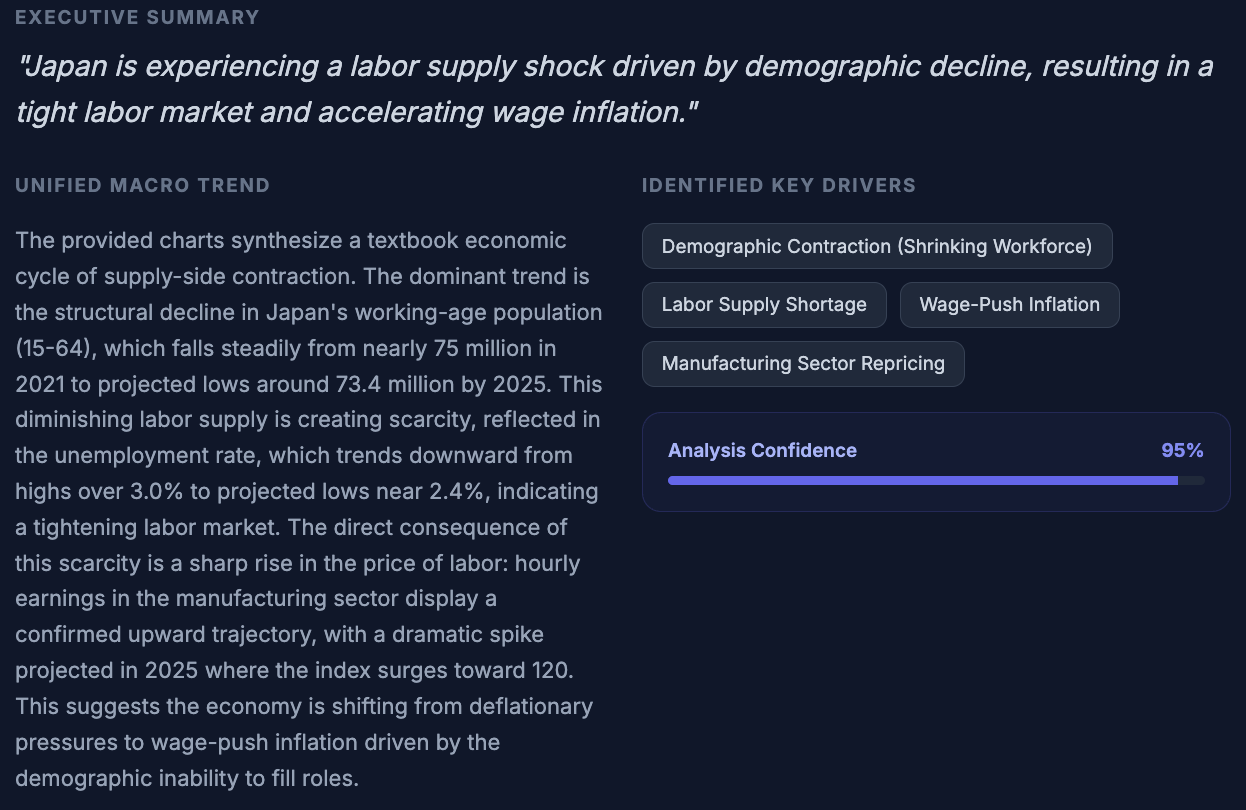
In 30 seconds, the economic report was generated. Below is an excerpt. I was genuinely impressed by the depth of analysis derived from just three charts. Gemini 3 Flash is truly formidable!
 

Conclusion

What do you think? Gemini 3 Flash is a fantastic value, being significantly cheaper than rival flagship models. Given that its multimodal performance is top-tier, I believe this will become the "go-to" model for many users. For AI startups like ours, having a model that allows for extensive experimentation with high token volumes without breaking the bank is incredibly reassuring. I highly recommend giving it a try!

Stay tuned!


You can enjoy our video news ToshiStats-AI from this link, too!


1) Gemini 3 Flash: frontier intelligence built for speed, Dec 17, 2025, Google

Copyright © 2025 Toshifumi Kuga. All right reserved
Notice: ToshiStats Co., Ltd. and I do not accept any responsibility or liability for loss or damage occasioned to any person or property through using materials, instructions, methods, algorithms or ideas contained herein, or acting or refraining from acting as a result of such use. ToshiStats Co., Ltd. and I expressly disclaim all implied warranties, including merchantability or fitness for any particular purpose. There will be no duty on ToshiStats Co., Ltd. and me to correct any errors or defects in the codes and the software.

Back to object detection after a break! Generative AI shows no signs of slowing down

It's remarkable to see the rapid progress of generative AI. Recently, the improvement in multimodal capabilities, which process information like images and videos in addition to natural language, has been outstanding. This is sometimes referred to as AI's "spatial understanding." Let's briefly experiment with what kind of information generative AI can extract from images to check the performance of the current Gemini 2.5-flash model.


1. Google AI Studio

I'll be using the familiar generative AI development platform, Google AI Studio (1), again. I've prepared a no-code app for spatial understanding. It can display the number of identified objects and their coordinates. For example, for "hands," it shows them like this. It accurately identifies two hands.


2. Generative AI Understands the Meaning of Words and Can Identify Objects

So, what about a task that requires understanding the positional relationship between a flower and a hand, such as "a hand holding a flower"? The result is a successful identification.

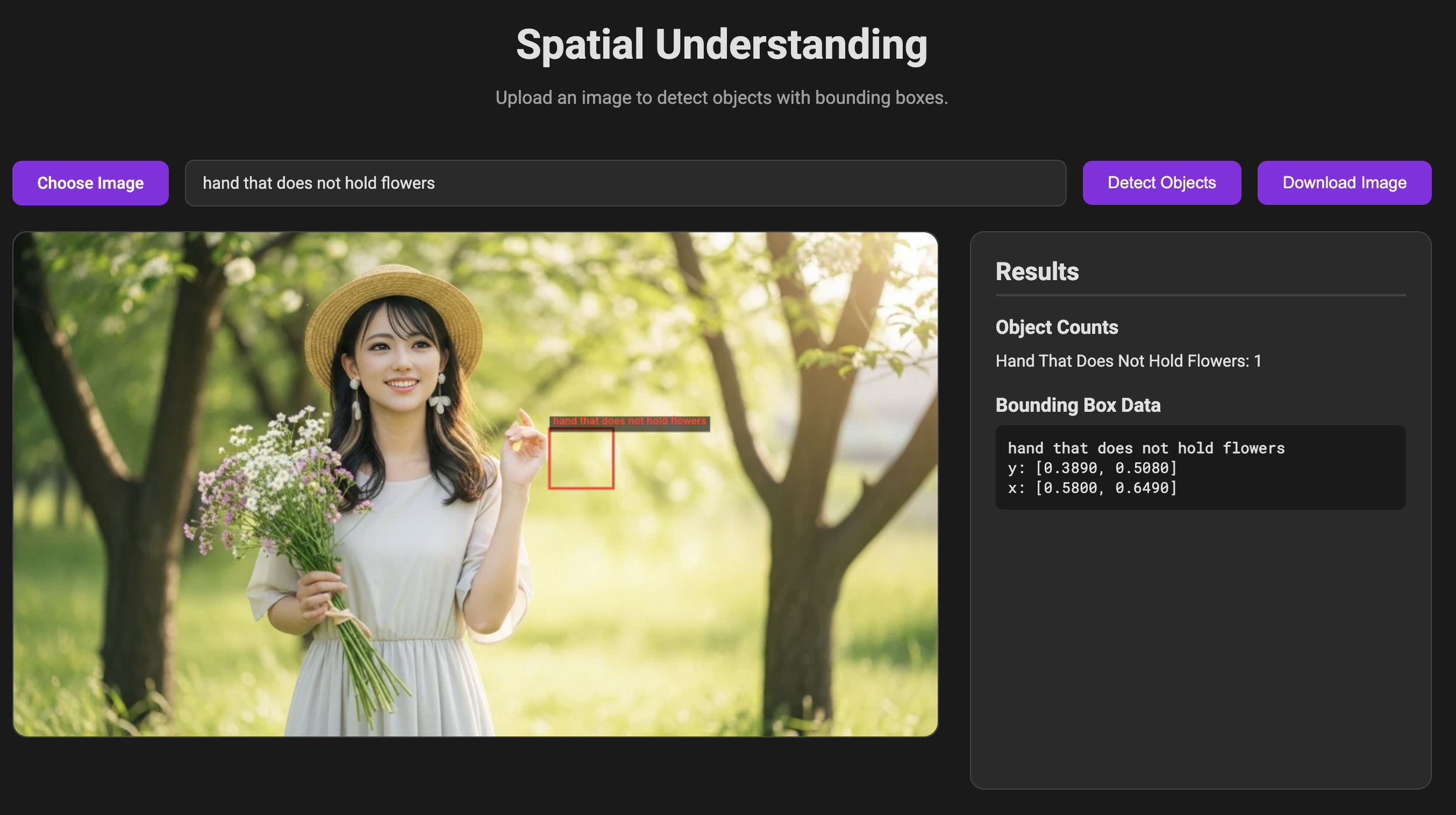
Conversely, what about a task like "a hand not holding a flower"? The result is also a successful identification. This is impressive; it identified it with no problem.

Next, can it identify an object based solely on its positional relationship? Let's ask it to identify "what's on the hamburg." It easily answered "fried egg." While this generative AI, Gemini, has been touted for its high-performance image processing since its debut in December 2023, I'm honestly surprised it can do this much.


3. Can It Identify Station Names from a Sign?

Let's try a slightly more difficult task. This is a section of a subway station sign in Kuala Lumpur, the capital of Malaysia. Let's see if it can identify the three stations between Ampang Park and Chan Sow Lin from this image of the sign.

The result was that it accurately identified the three stations. This is a task that requires it to not only read the text in the image correctly but also understand the positional relationship of the stations. It accomplished this without any difficulty. I have nothing more to say; it's amazing!


What do you think? I'm sure many of you are surprised by the high level of spatial understanding. Generative AI is still in its early stages, so its performance will continue to improve, and accordingly, its practical applications will expand. It's something to look forward to. Also, I created this AI app on Google AI Studio without writing any code. Google AI Studio is very user-friendly and high-performing. I encourage you all to try it. Toshi Stats will continue to challenge itself to build various AI apps. Please stay tuned!


Copyright © 2025 Toshifumi Kuga. All right reserved

1) Google AI Studio

Notice: ToshiStats Co., Ltd. and I do not accept any responsibility or liability for loss or damage occasioned to any person or property through using materials, instructions, methods, algorithms or ideas contained herein, or acting or refraining from acting as a result of such use. ToshiStats Co., Ltd. and I expressly disclaim all implied warranties, including merchantability or fitness for any particular purpose. There will be no duty on ToshiStats Co., Ltd. and me to correct any errors or defects in the codes and the software.

I tried creating and implementing an AI app with no-code on Google AI Studio, and it was amazing!

Google has been rapidly releasing generative AI and related products recently, with Google AI Studio (1) particularly standing out as a developer platform. It integrates the latest image and video generation AI, truly embodying a multimodal platform. What's more, it's free up to a certain limit, making it a powerful ally for startups like ours. So, let's actually create an AI application with this platform!


1. Google AI Studio Portal

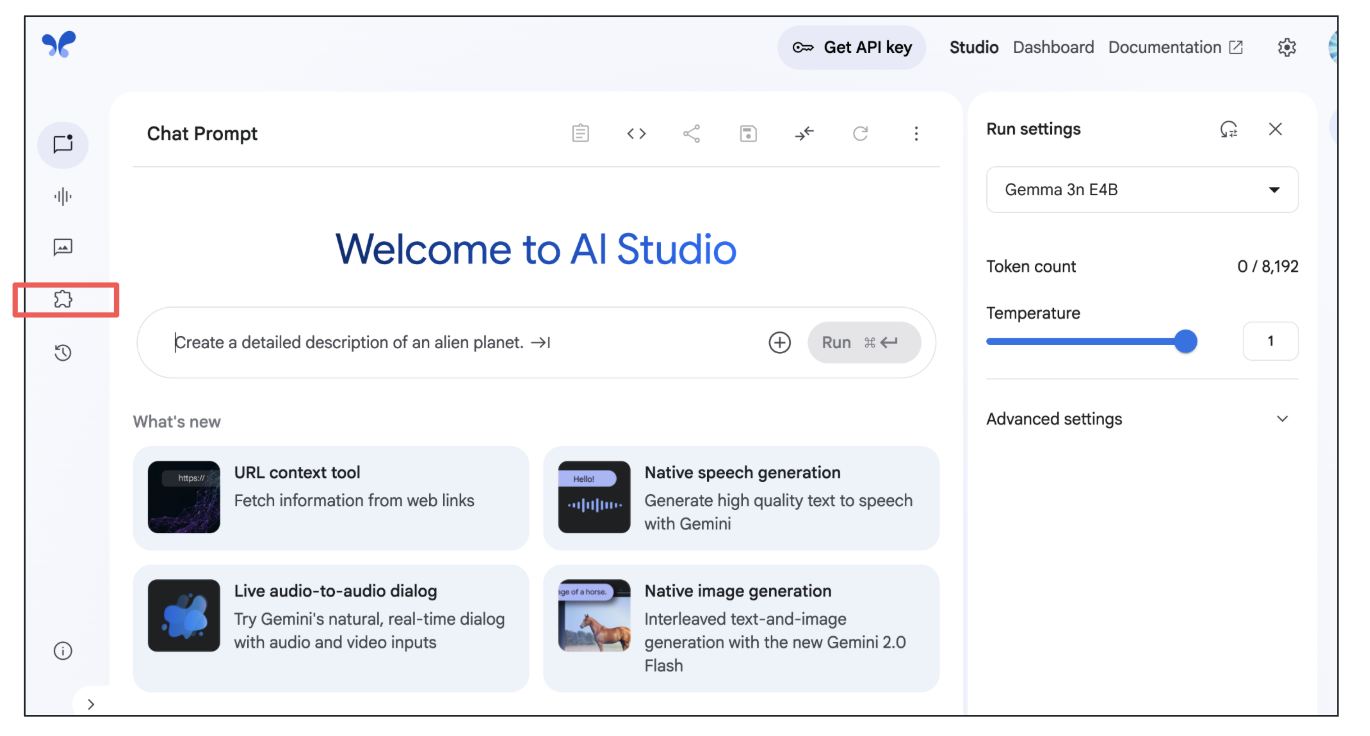
Below is the Google AI Studio portal. It has so many features that an AI beginner might get confused without prior knowledge. I suppose that's why it's a developer-oriented platform. By clicking the button in the red box, you'll be taken to a site where you can create an application simply by writing a prompt.

Google AI Studio

Here's the prompt I used this time.

"As a 'Complaint Categorization Agent,' you are an expert at understanding which product a customer is complaining about. You can select only one product from the complaint. Comprehensively analyze the provided complaint and classify it into one of the following categories:

  • Mortgage

  • Checking or savings account

  • Student loan

  • Money transfer, virtual currency, or money service

  • Bank account or service

  • Consumer Loan

Your output should be only one of the above categories. All samples must be classified into one of these classes. Results for all samples are required. Create a GUI that adds the ability to input a CSV file of customer complaints and generate a graph showing the distribution of customer complaint classes. Add features to the GUI to add labeled data independently of the customer complaint CSV file, calculate and display accuracy, and display a confusion matrix of the results."

Just by typing this prompt into the box and running it, the application described below is created. I didn't use any coding like Python at all. It's amazing!


2. Tackling a Real Classification Task with the Created App

After two or three attempts, the final application I built is shown below. It handles the task of classifying bank customer complaints by financial product. This time, I've set it to six types of financial products, but generative AI can achieve high accuracy even without prior training, so it's possible to classify many more classes if desired.

Input Screen

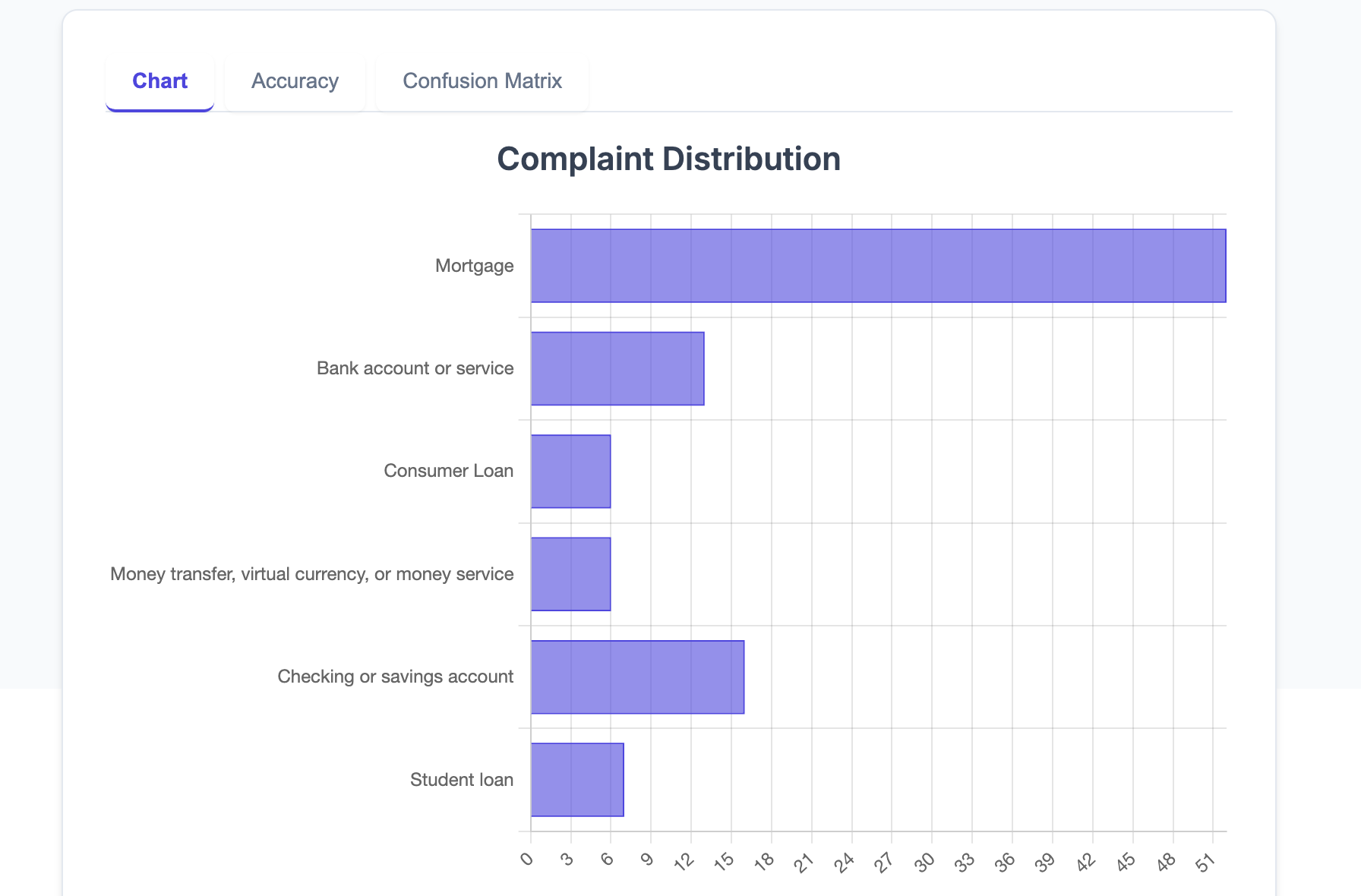
We import customer complaints via a CSV file. This time, I'll use 100 complaints. Furthermore, if ground truth data is available, I've added functionality to output accuracy and a confusion matrix. Below are the actual classification results. The distribution of the six financial products is displayed. It seems this customer complaint data primarily concerns mortgages.

Class Distribution

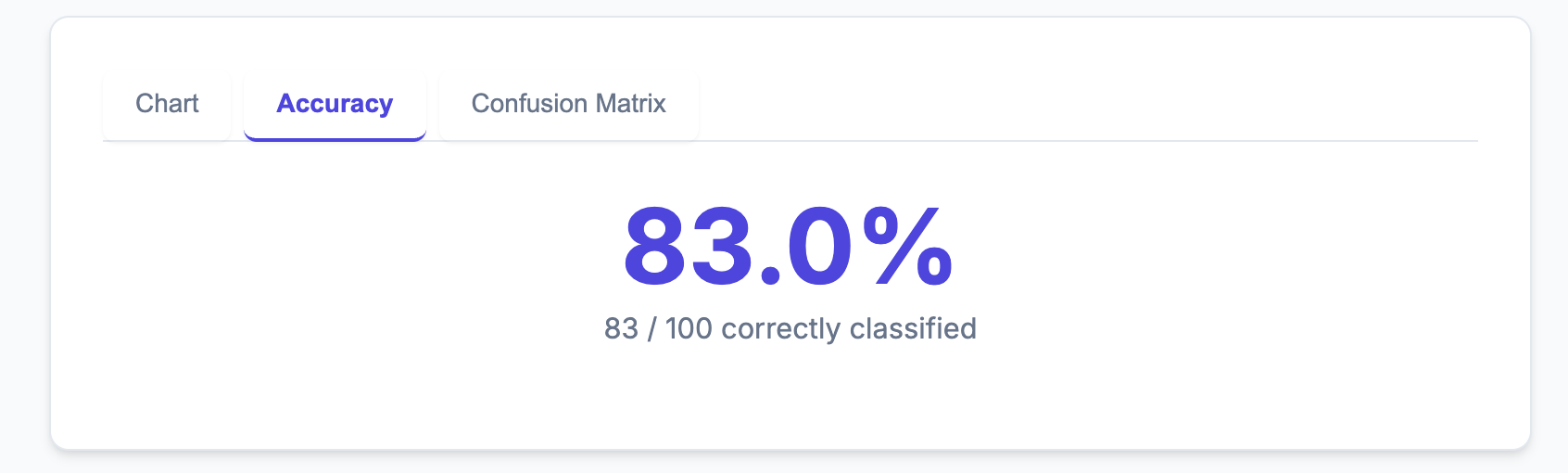
Here's the crucial classification accuracy. This time, we achieved over 80% accuracy, at 83%, without any prior training. It's incredible!

Classification accuracy

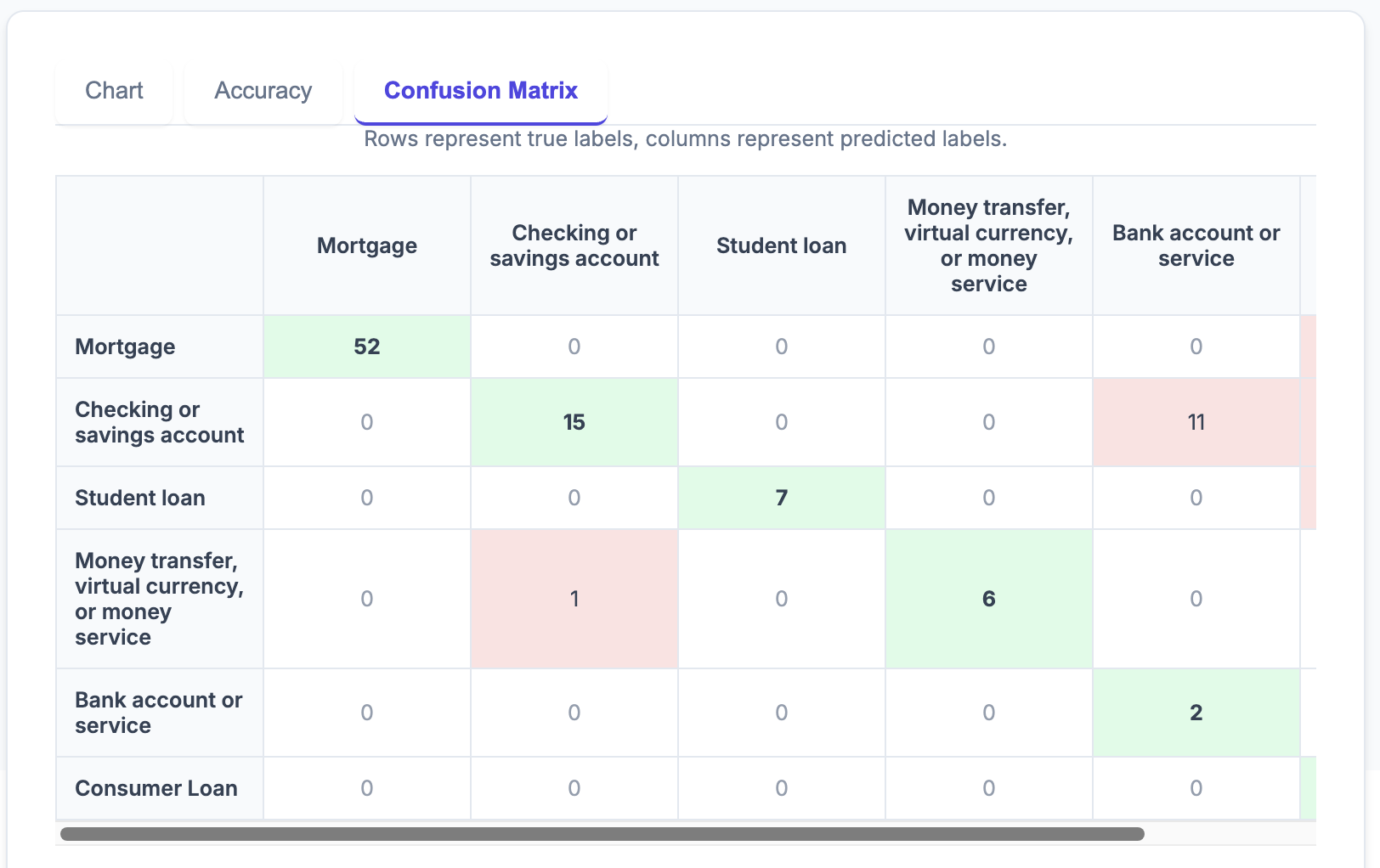
The confusion matrix, often used in classification tasks, can also be displayed. This not only provides a numerical accuracy but also shows where classification errors frequently occur, making it easier to set guidelines for improving accuracy and enabling more effective improvements.

Confusion Matrix


3. Agent Evaluation

What I realized when creating this app was that if some evaluation metric is available, the quality of discussions for subsequent improvements deepens. Trying with just a few samples won't give a good grasp of the generative AI's behavior. Ideally, preparing at least 10, and ideally 100 or more, samples with corresponding ground truth data, and having the AI app output evaluation metrics, would enable effective accuracy improvement suggestions. This theme is called "Agent evaluation," and I believe it will become essential for building practical AI applications in the future.


What do you think? Despite not doing any programming at all this time, I was able to create such an amazing AI application. Google AI Studio integrates perfectly with Google Cloud, allowing you to deploy your app to the cloud with a single button and use it worldwide. Toshi Stats will continue to challenge ourselves by building various AI applications. Stay tuned!


Copyright © 2025 Toshifumi Kuga. All right reserved

1) Google AI Studio

Notice: ToshiStats Co., Ltd. and I do not accept any responsibility or liability for loss or damage occasioned to any person or property through using materials, instructions, methods, algorithms or ideas contained herein, or acting or refraining from acting as a result of such use. ToshiStats Co., Ltd. and I expressly disclaim all implied warranties, including merchantability or fitness for any particular purpose. There will be no duty on ToshiStats Co., Ltd. and me to correct any errors or defects in the codes and the software.