Vibe Coding

Improving ML Vibe Coding Accuracy: Hands-on with Claude Code's Plan Mode

2025 was a year where I actively incorporated "Vibe Coding" into machine learning. After repeated trials, I encountered situations where coding accuracy was inconsistent—sometimes good, sometimes bad.

Therefore, in this experiment, I decided to use Claude Code "Plan Mode" (1) to automatically generate an implementation plan via an AI agent before generating the actual code. Based on this plan, I will attempt to see if a machine learning model can be built stably using "Vibe Coding." Let's get started!


1. Generating an Implementation Plan with Claude Code "Plan Mode"

Once again, I would like to build a model that predicts in advance whether a customer will default (on a loan, etc.). I will use publicly available credit card default data (2). For the code assistant, I am using Claude Code, and for the IDE, the familiar VS Code.

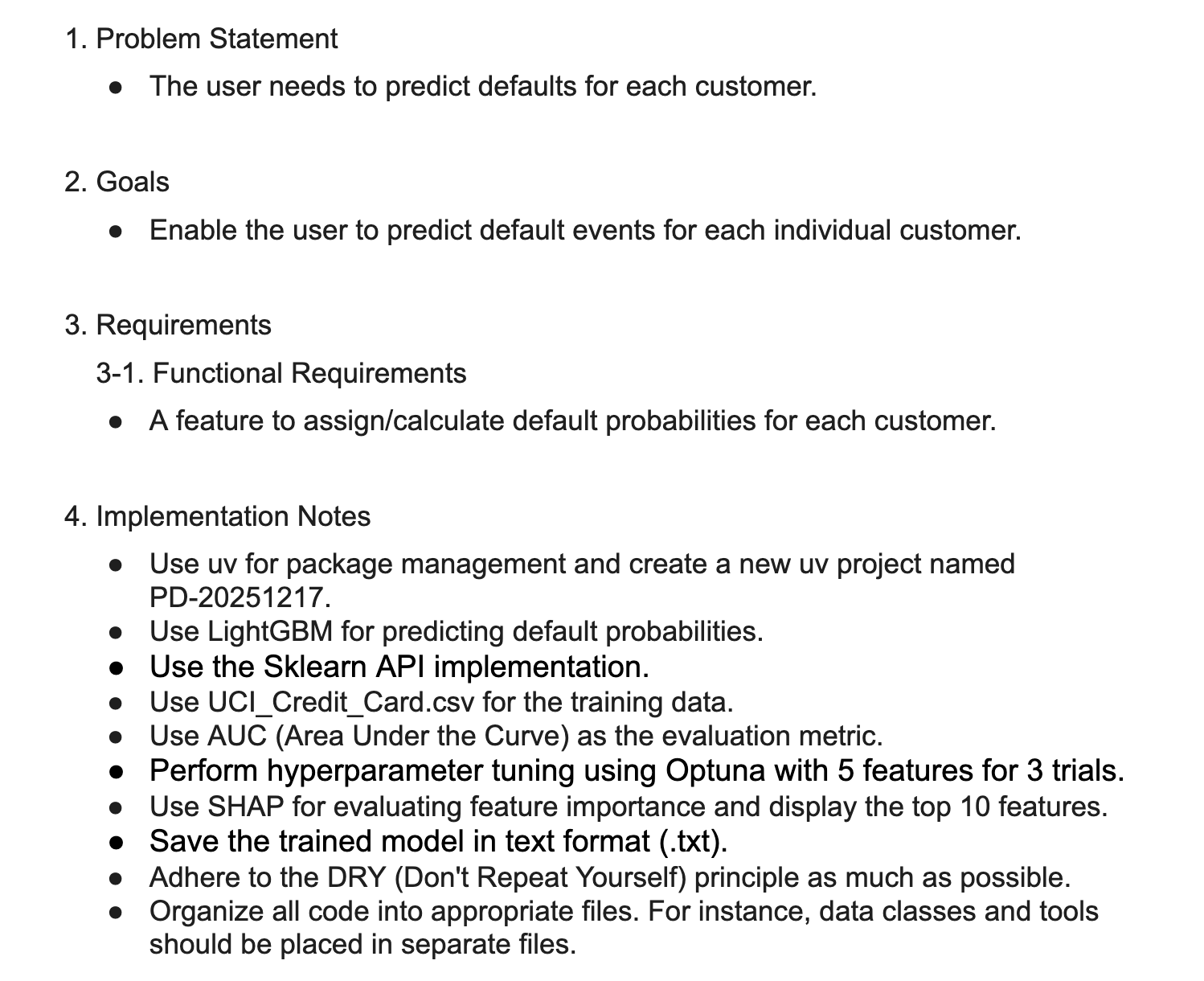
To provide input to the Claude Code AI agent, I summarized the task and implementation points into a "Product Requirement Document (PRD)." This is the only document I created.

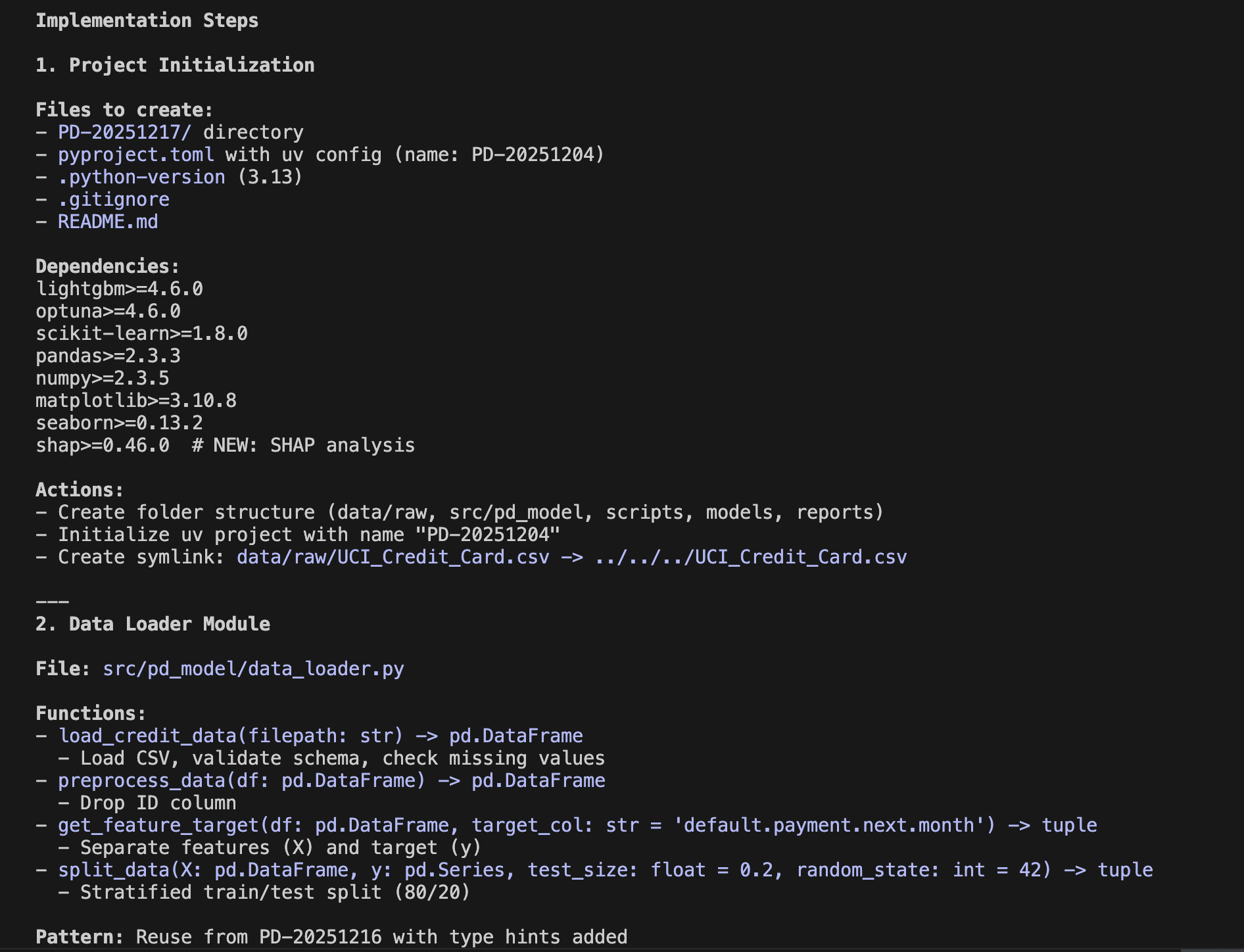
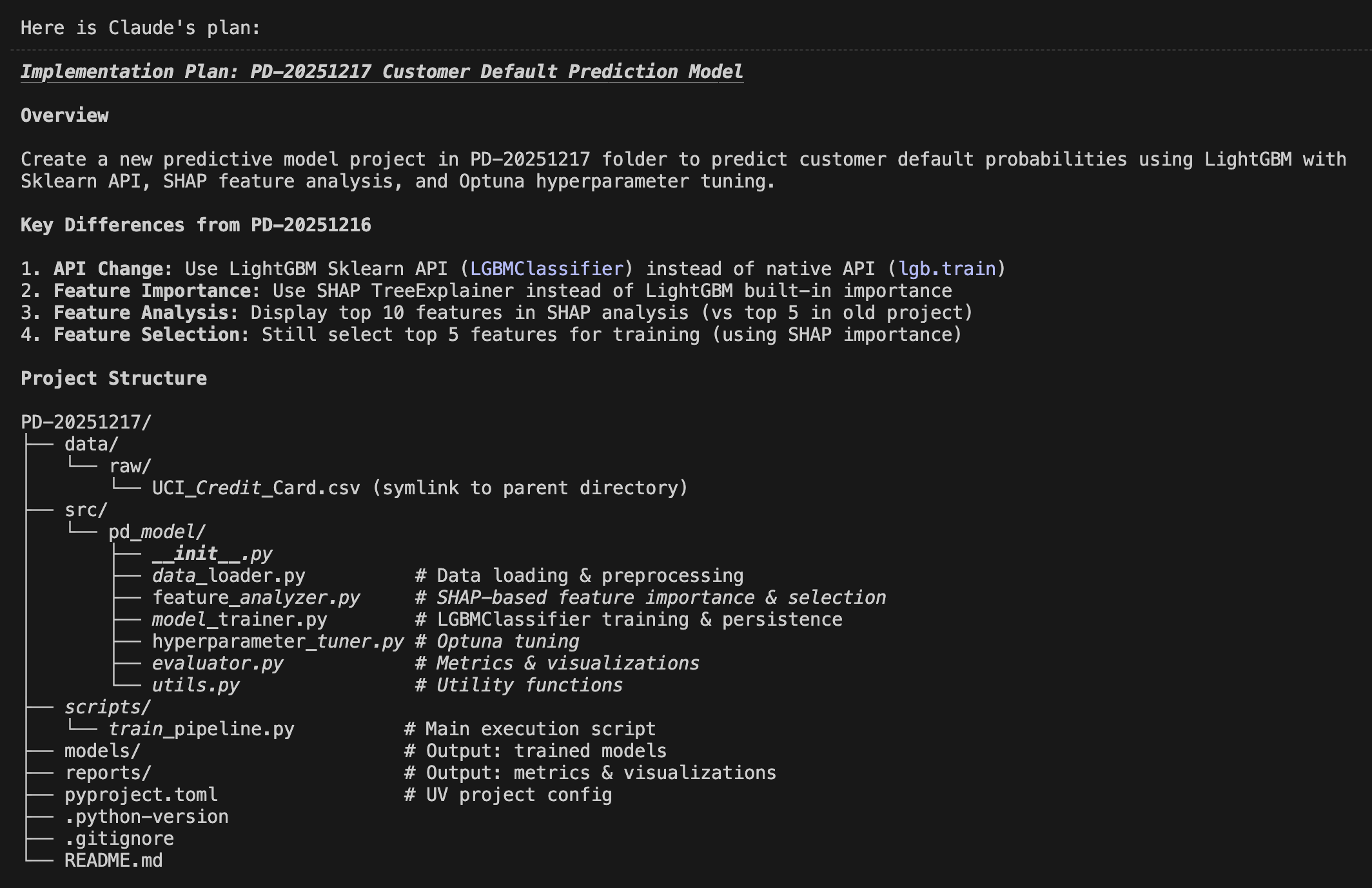
I input this PRD into Claude Code "Plan Mode" and instructed it to: "Create a plan to create predictive model under the folder of PD-20251217".

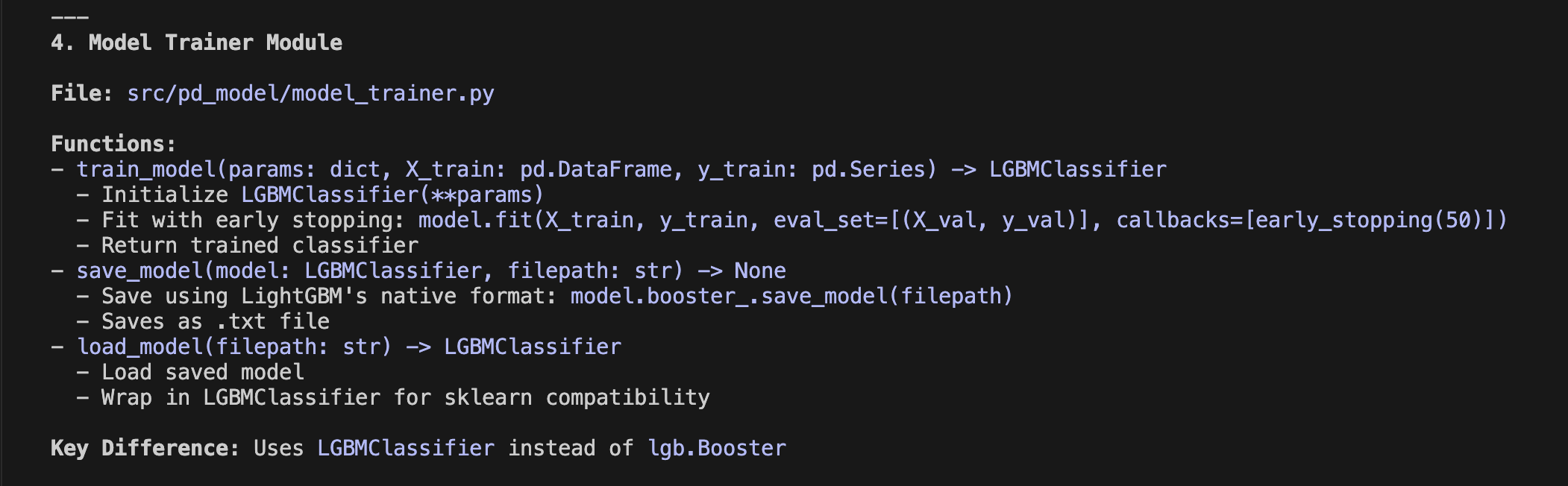
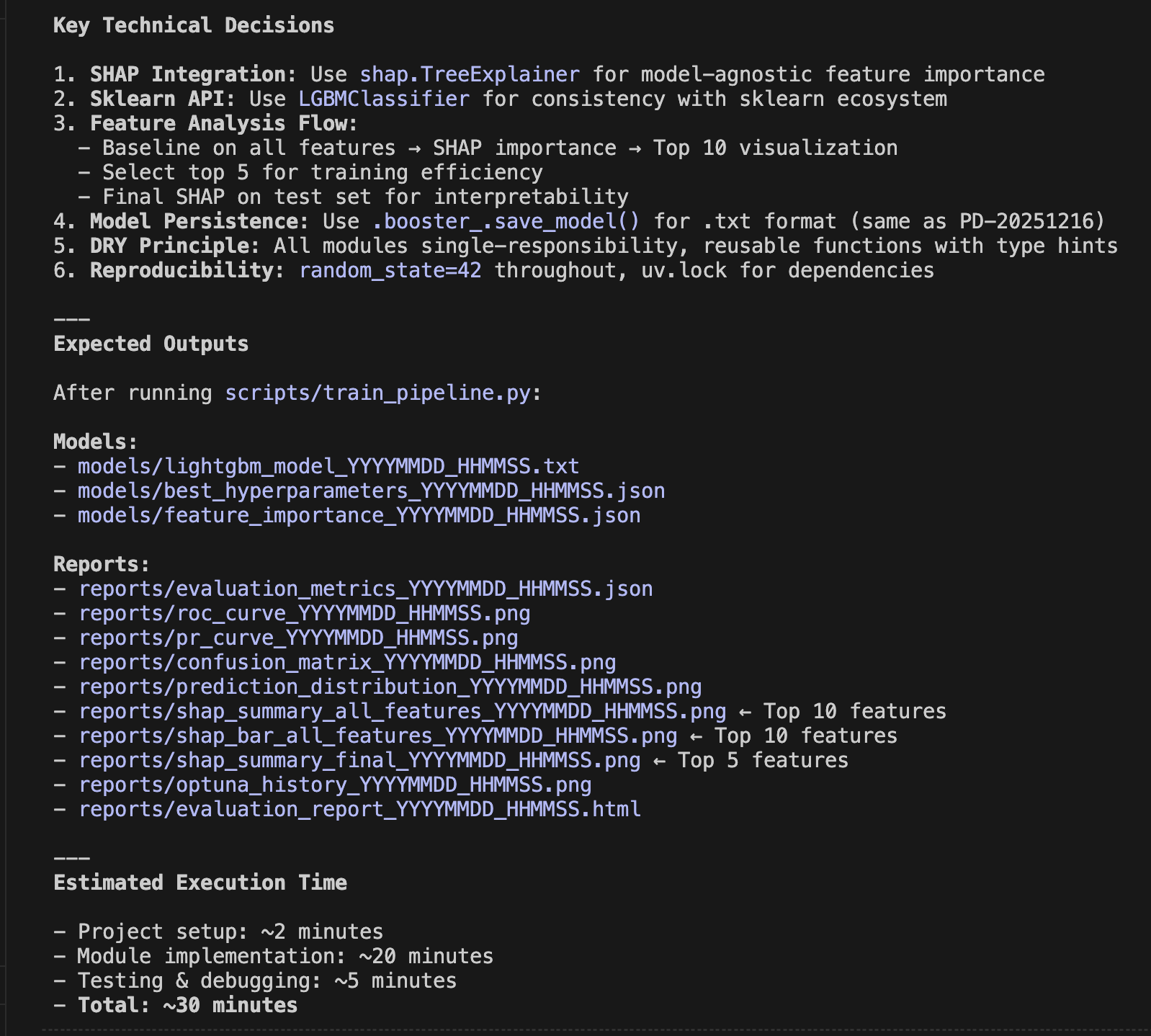
Within minutes, the following implementation plan was generated. Comparing it to the initial PRD, you can see how refined it is. Note that I am only showing half of the actual plan generated here—a truly detailed plan was created. I can only say that the ability of the AI agent to envision this far is amazing.


2. Beautifully Visualizing Prediction Accuracy

When this implementation plan is approved and executed, the prediction model is generated. Naturally, we are curious about the accuracy of the resulting model.

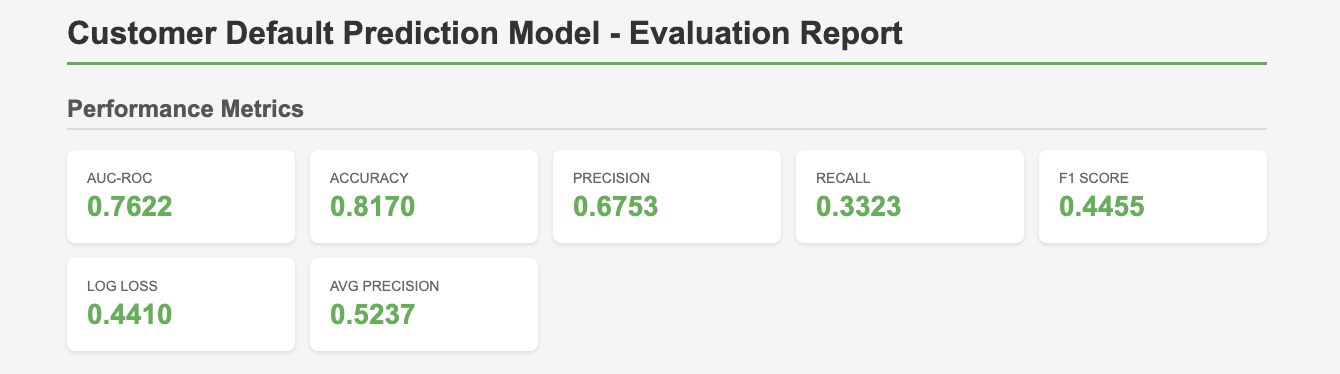
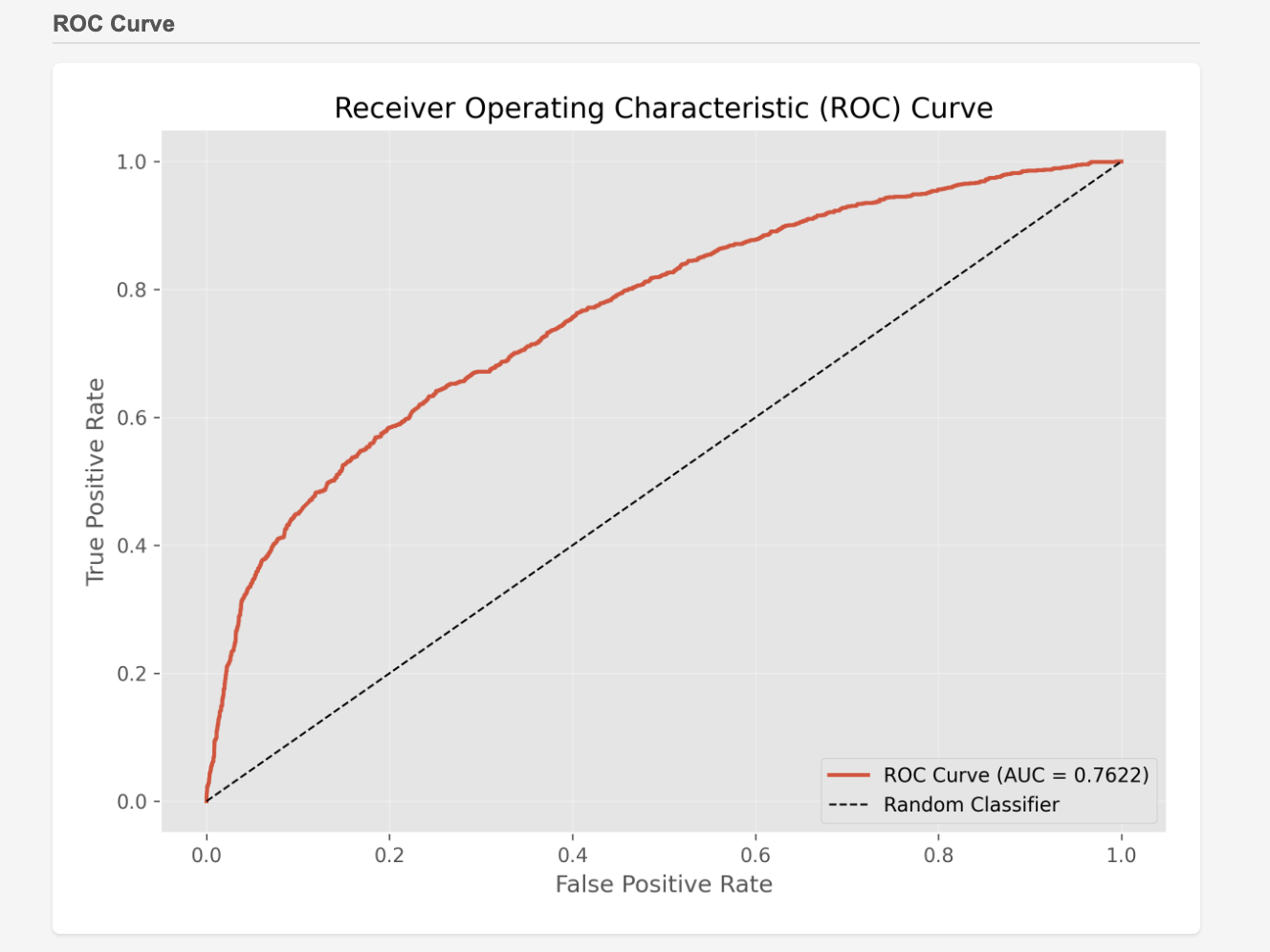
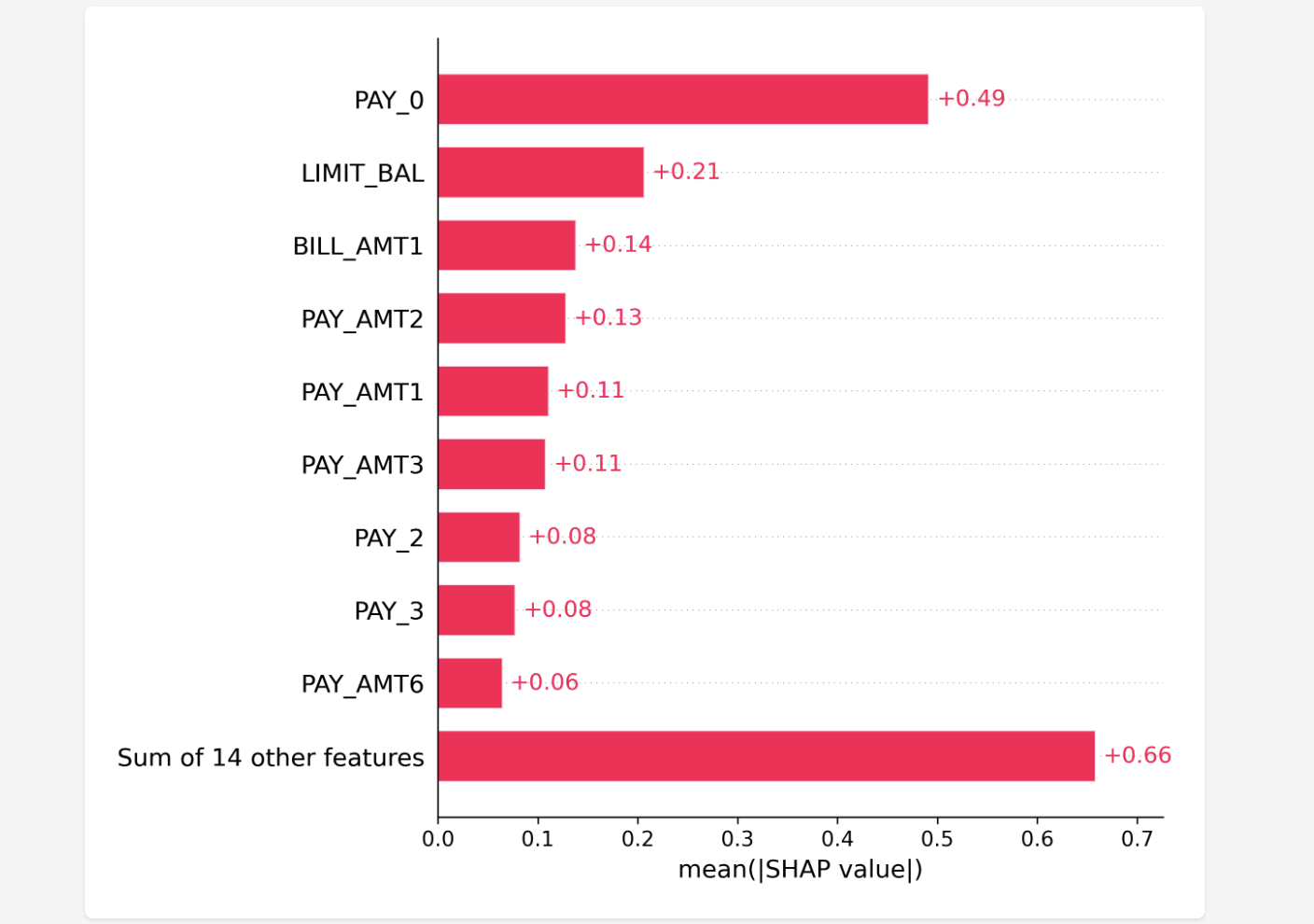
Here, it is visualized clearly according to the implementation plan. While these are familiar metrics for machine learning experts, all the important ones are covered and visualized in an easy-to-understand way, summarized as a single HTML file viewable in a browser.

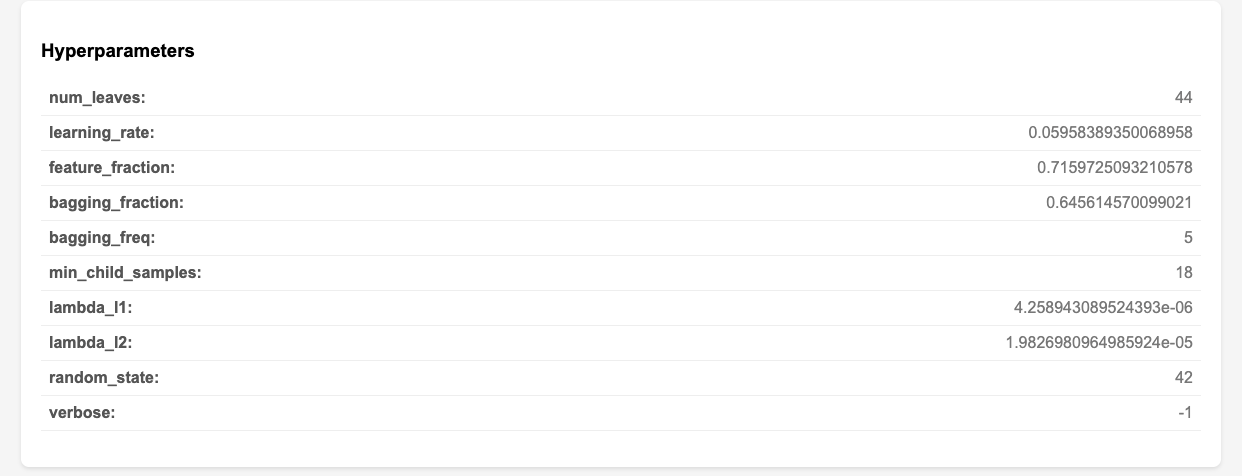
The charts below are excerpts from that file. It includes ROC curves, SHAP values, and even hyperparameter tuning results. This time, the total implementation time was about 10 minutes. If it can be generated automatically to this extent in that amount of time, I’d rather leave it to the AI agent.


3. Meta-Prompting with Claude Code "Plan Mode"

A Meta-Prompt refers to a "prompt (instruction to AI) used to create and control prompts."

In this case, I called Claude Code "Plan Mode" and instructed it to "generate an implementation plan" based on my PRD. This is nothing other than executing a meta-prompt in "Plan Mode."

Thanks to the meta-prompt, I didn't have to write a detailed implementation plan myself; I only needed to review the output. It is efficient because I can review it before coding, and since that implementation plan can be viewed as a highly precise prompt, the accuracy of the actual coding is expected to improve.

To be honest, I don't have the confidence to write the entire implementation plan myself. I definitely want to leave it to the AI agent. It has truly become convenient!


How was it? Generating implementation plans with Claude Code "Plan Mode" seems applicable not only to machine learning but also to various other fields and tasks. I definitely intend to continue trying it out in the future. I encourage everyone to give it a challenge as well.

That’s all for today. Stay tuned!


You can enjoy our video news ToshiStats-AI from this link, too!

1) How to use Plan Mode,  Anthropic

2) Default of Credit Card Clients


Copyright © 2025 Toshifumi Kuga. All right reserved
Notice: ToshiStats Co., Ltd. and I do not accept any responsibility or liability for loss or damage occasioned to any person or property through using materials, instructions, methods, algorithms or ideas contained herein, or acting or refraining from acting as a result of such use. ToshiStats Co., Ltd. and I expressly disclaim all implied warranties, including merchantability or fitness for any particular purpose. There will be no duty on ToshiStats Co., Ltd. and me to correct any errors or defects in the codes and the software.

Can You "Vibe Code" Machine Learning? I Tried It and Built an App

2025 was the year the coding style known as "Vibe Coding" truly gained mainstream acceptance. So, for this post, I conducted an experiment to see just how far we could go in building a machine learning model using only AI agents via "Vibe Coding"—with almost zero human programming involved. Let's get started!

 
  1. The Importance of the "Product Requirement Document" for Task Description

This time, I wanted to build a model that predicts whether bank loan customers will default. I used the publicly available Credit Card Default dataset (1).

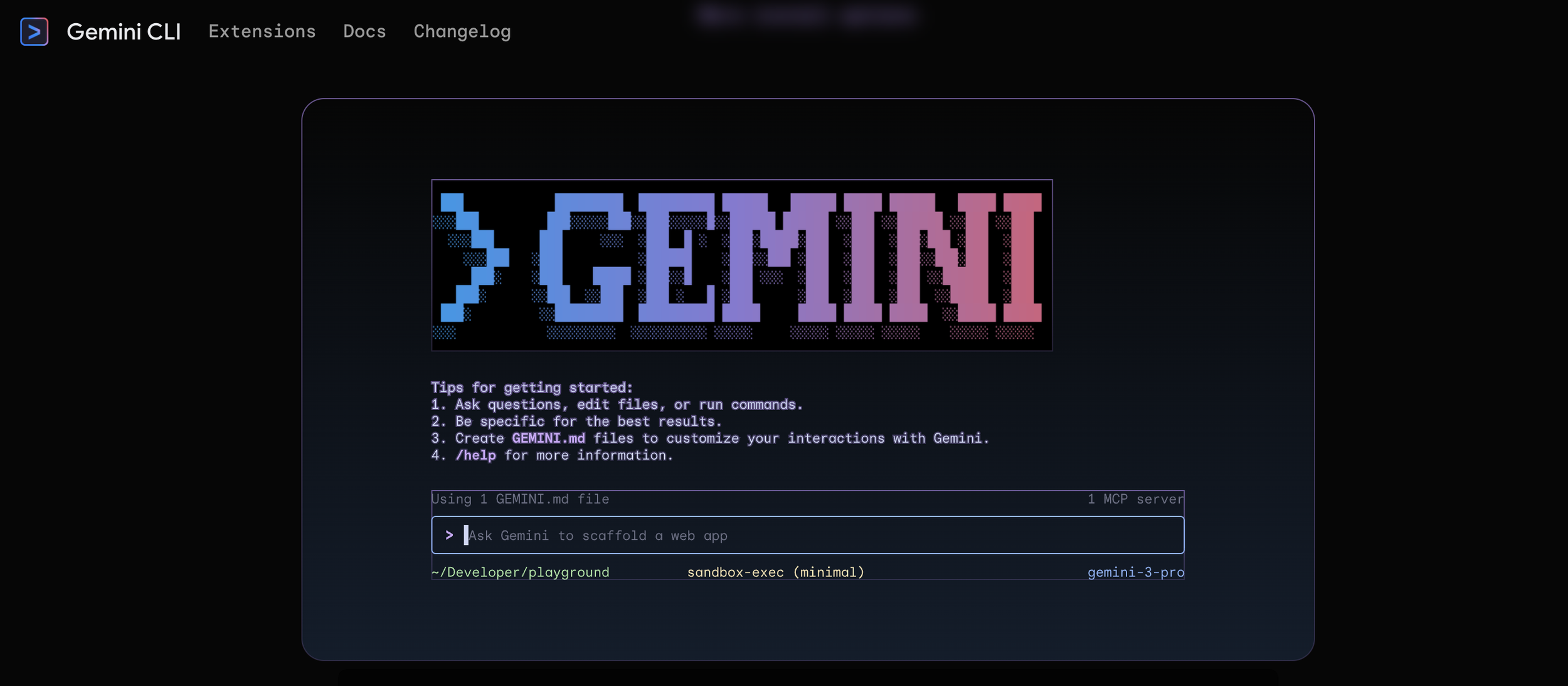
In Vibe Coding, we delegate the actual writing of the program to the AI agent, while the human shifts to a reviewer role. In practice, having a tool called a "Code Assistant" is very convenient. For this experiment, I used Google's Gemini CLI. For the IDE, I used the familiar VS Code.

Gemini CLI

To entrust the coding to an AI agent, you must teach it exactly what you want it to do. While it is common to enter instructions as prompts in a chatbot, in Vibe Coding, we want to use the same prompts repeatedly, so we often input them as Markdown files.

It is best to use what is called a "Product Requirement Document (PRD)" for this content. You summarize the goals you want the product to achieve, the libraries you want to use, etc. The PRD I created this time is as follows:

PRD

By referencing this PRD and entering a prompt to create a default prediction model, the model was built in just a few minutes. The evaluation metric, AUC, was also excellent, ranging between 0.74 and 0.75. Amazing!!


2. Describing the Folder Structure with PROJECT_SUMMARY

It is wonderful that the machine learning model was created, but if left as is, we won't know which files are where, and handing it over to a third party becomes difficult.

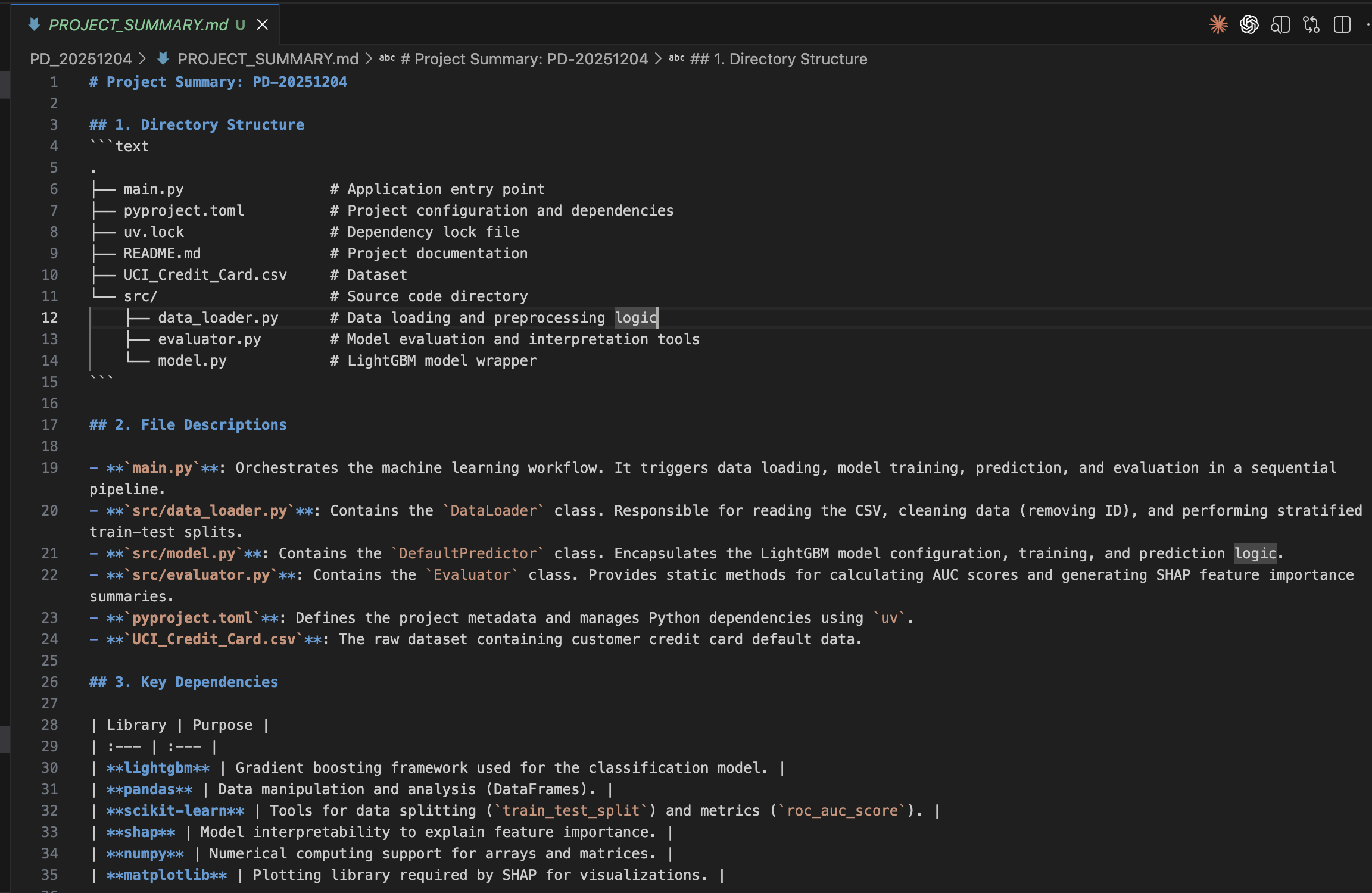
Therefore, if you input the prompt: "Analyze the current directory structure and create a concise summary that includes: 1. A tree view of all files 2. Brief description of what each file does 3. Key dependencies and their purposes 4. Overall architecture pattern Save this as PROJECT_SUMMARY.md", it will create a Markdown file like the one below for you.

PROJECT_SUMMARY.md

With this, anyone can understand the folder structure at any time, and it is also convenient when adding further functional extensions later. I highly recommend creating a PROJECT_SUMMARY.md.


3. Adding a UI and Turning the ML Model into an App

Since we built such a good model, we want people to use it. So, I experimented to see if I could build an app using Vibe Coding as well.

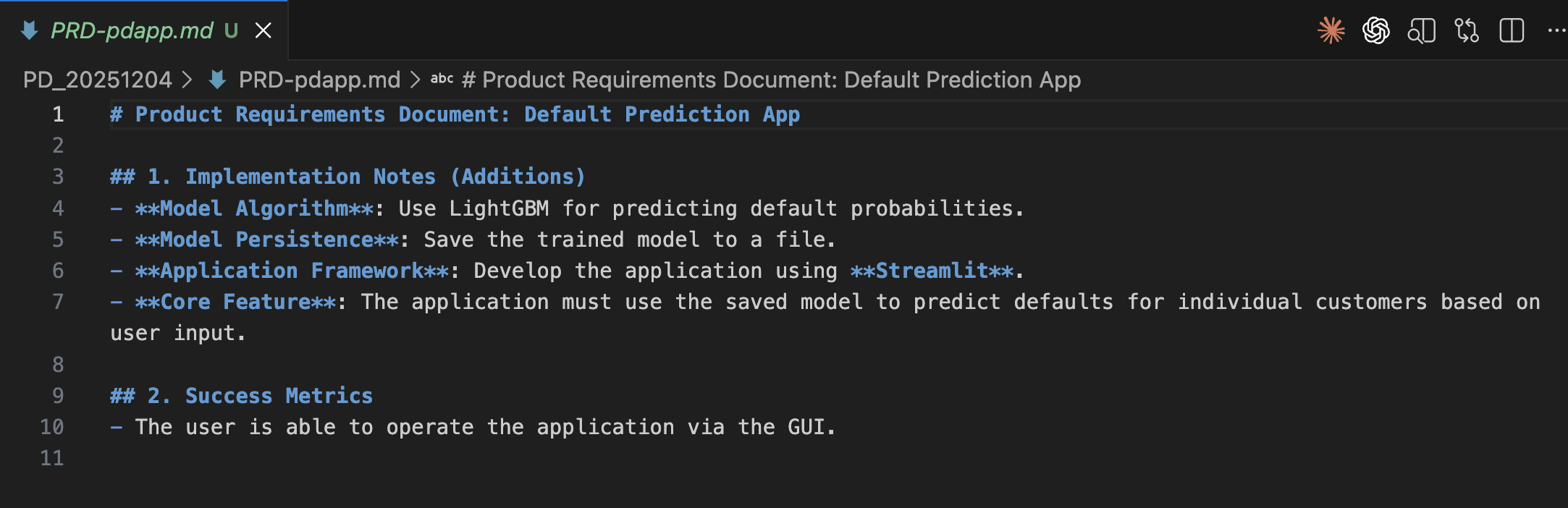
I created PRD-pdapp.md and asked the AI agent to build the app. I instructed it to save the model file and to use Streamlit for app development. The actual file and its translation are below:

PRD-pdapp.md

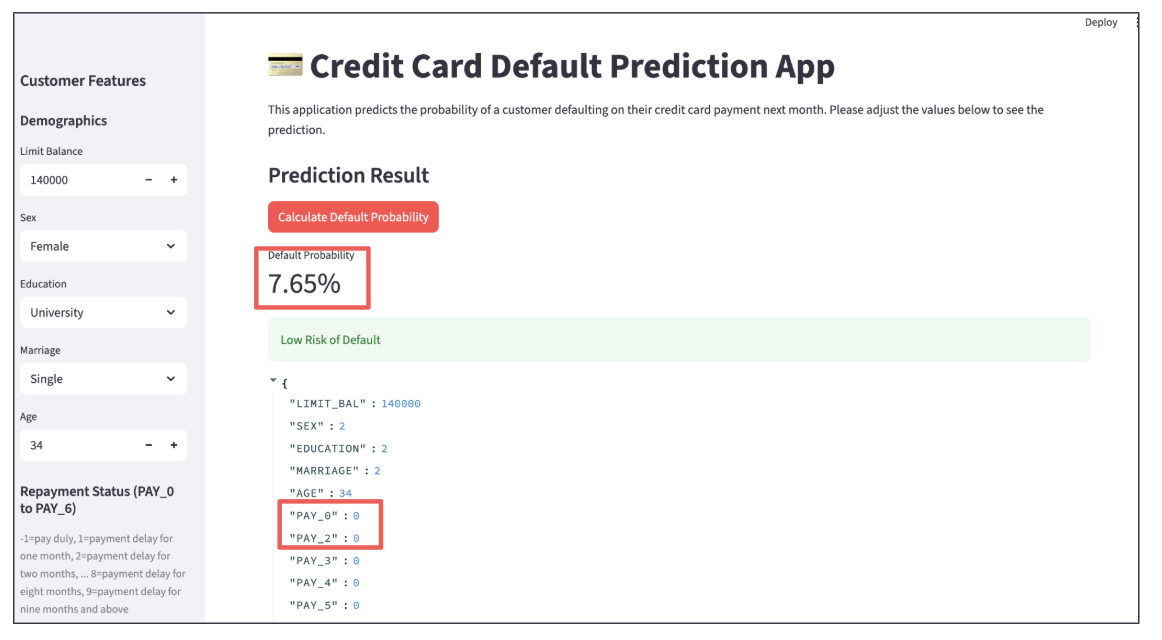
When executed, the following app was created. It looks cool, doesn't it?

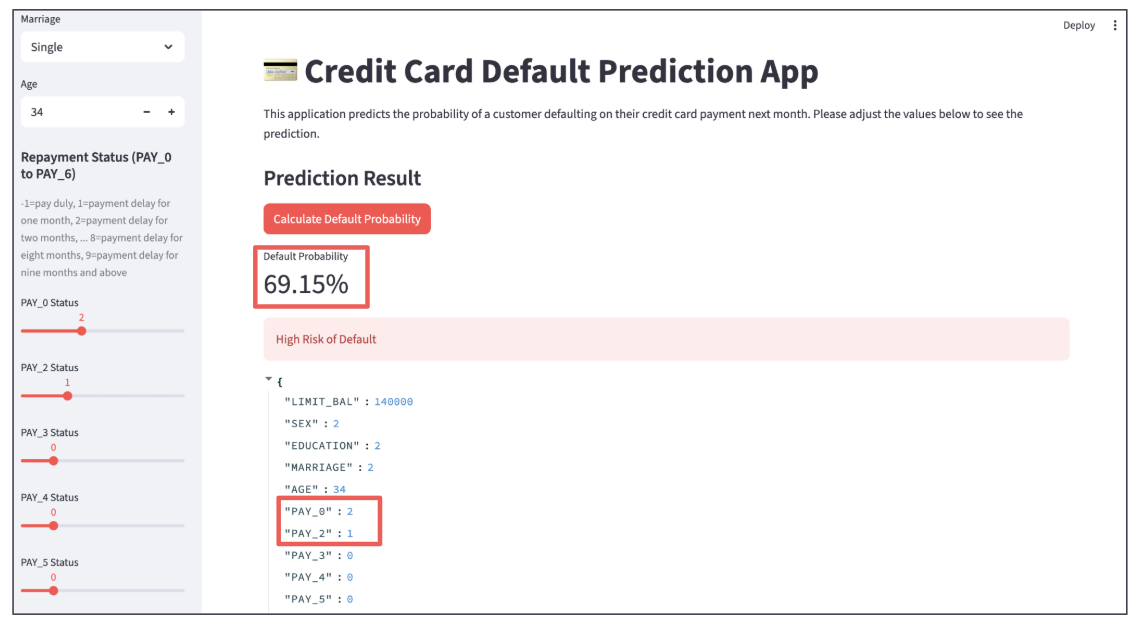
You can input customer data using the boxes and sliders on the left, and when you click the red button, the probability of default is calculated.

  • Customer 1: Default probability is 7.65%, making them a low-risk customer.

  • Customer 2: Default probability is 69.15%, which is high, so I don't think we can offer them a loan. The PAY_0 Status is "2", meaning their most recent payment status is 2 months overdue. This is the biggest factor driving up the default probability.

As you can see, having a UI is incredibly convenient because you can check the model's behavior by changing the input data. I was able to create an app like this using Vibe Coding. Wonderful.


How was it? It was indeed possible to perform machine learning using Vibe Coding. However, instead of programming code, you need to create precise PRDs. I believe this will become a new and crucial skill. I encourage you all to give it a try.

That’s all for today. Stay tuned!


You can enjoy our video news ToshiStats-AI from this link, too!

1) Default of Credit Card Clients


Copyright © 2025 Toshifumi Kuga. All right reserved
Notice: ToshiStats Co., Ltd. and I do not accept any responsibility or liability for loss or damage occasioned to any person or property through using materials, instructions, methods, algorithms or ideas contained herein, or acting or refraining from acting as a result of such use. ToshiStats Co., Ltd. and I expressly disclaim all implied warranties, including merchantability or fitness for any particular purpose. There will be no duty on ToshiStats Co., Ltd. and me to correct any errors or defects in the codes and the software.
Google Antigravity: The Game Changer for Software Development in the Agent-First Era

Google has unveiled Gemini 3.0, its new generative AI, and "Antigravity" (1), a next-gen IDE powered by it. Google states that "Google Antigravity is our agentic development platform, evolving the IDE into the agent-first era," signaling a shift toward truly agent-centric development. Here, I’m going to task Antigravity with creating a "Bank Complaint Classification App." I want to actually run it to explore its potential.

                   Antigravity


1.Agentic Development with Antigravity

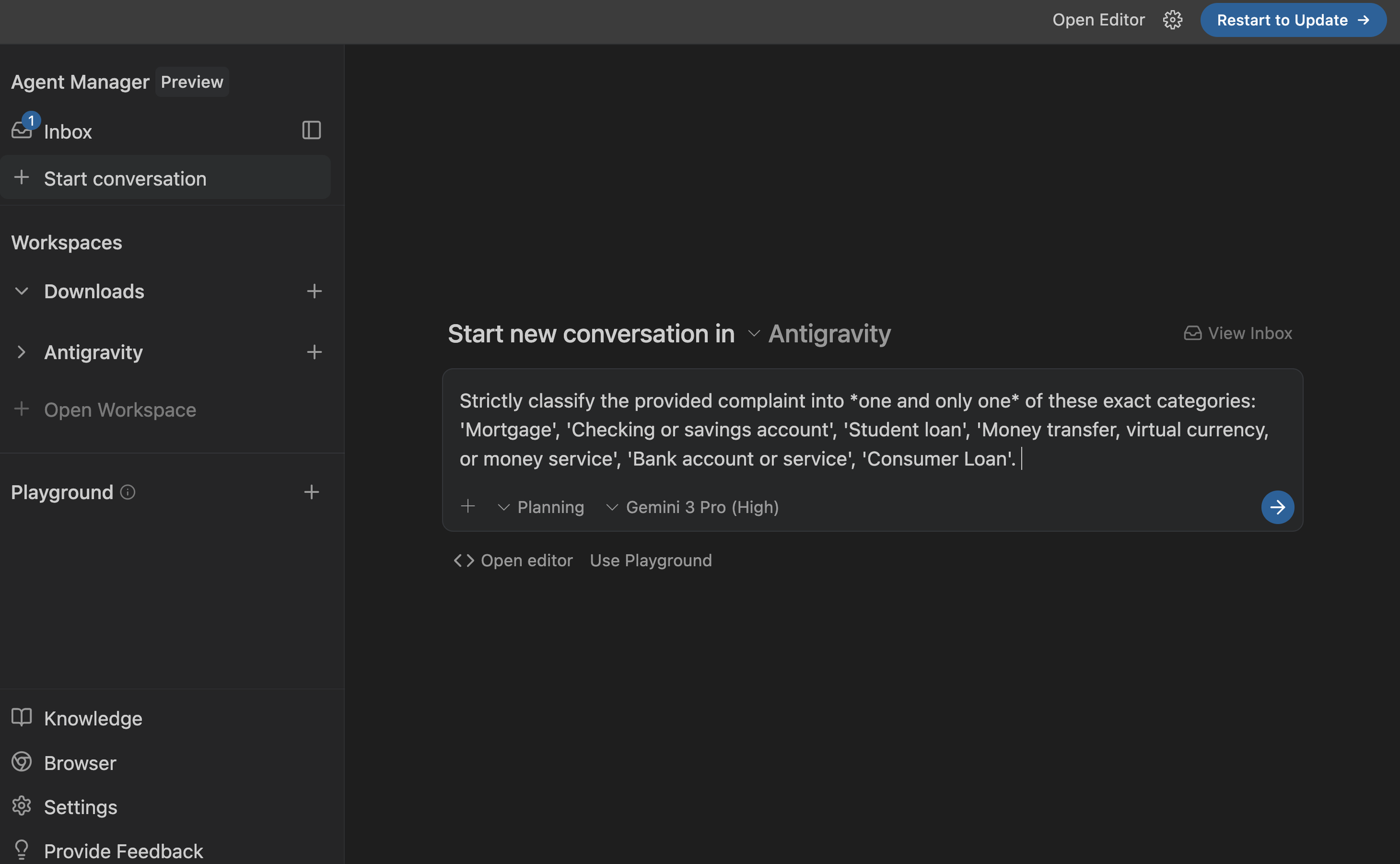
Antigravity is built on top of VS Code. If you are a VS Code user, the editor will look familiar, making it very approachable and easy to pick up. However, the real power of Antigravity lies in its dedicated interface for agentic development: the Agent Manager (shown below). Just enter a prompt into the box and run it to kick off "Vibe Coding." The prompt shown here is the very simple one I entered at the beginning of the development process. Antigravity also appears to be packed with various features designed to facilitate efficient communication with the Agent. For more details, please check the website (1).

                         Agent Manager


2. Prompt Refinement and Improvement

Just because you start "Vibe Coding" doesn't mean you'll get perfect code immediately. I started with a simple prompt this time as well, but the process proved to be more challenging than anticipated. While Gemini 3.0 Pro often demonstrates human-level capability when handling HTML and CSS for website building, the framework used for this app—Google ADK—is a brand-new agent development kit that just debuted in April 2025. Consequently, there are likely very few code examples available on the web, and I assume it hasn't been fully absorbed into Gemini 3.0's training data yet.

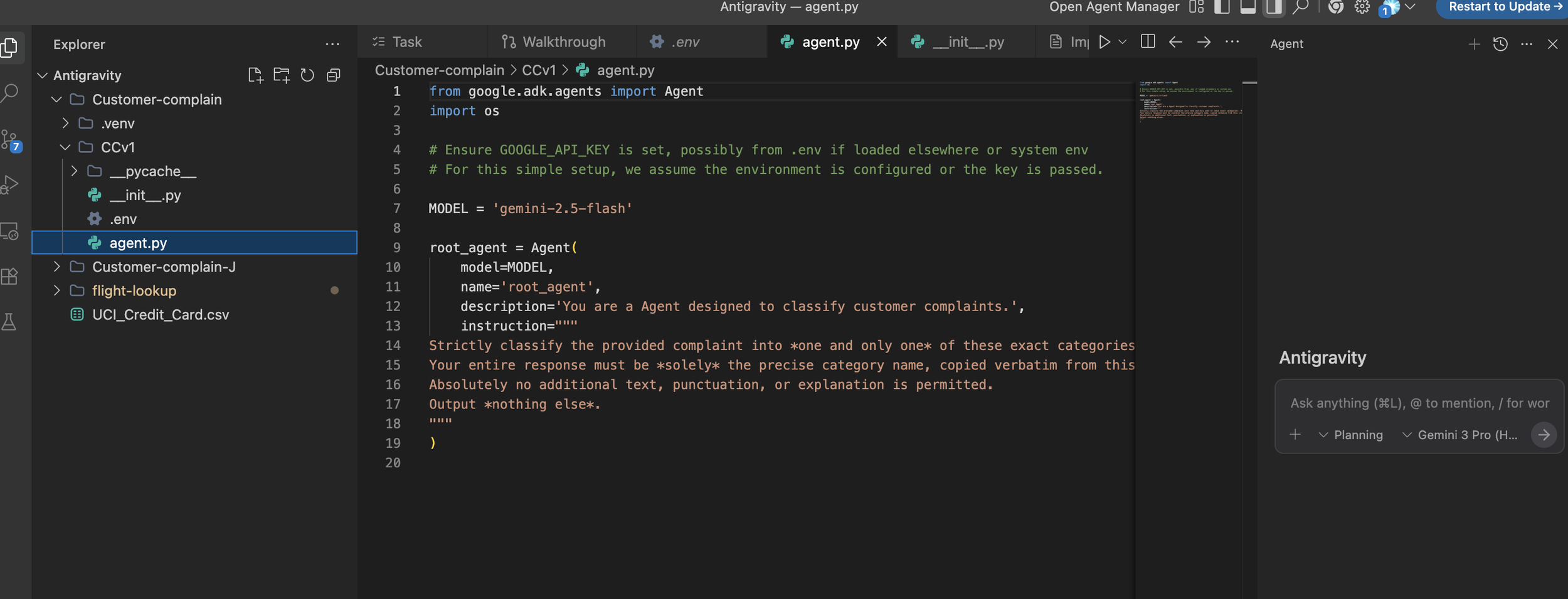
               Development with Google ADK

It was quite a struggle, but as shown above, I managed to build a fully functional app via "Vibe Coding." To generate these files, I relied solely on natural language instructions; I didn't write a single line of code directly in the editor. However, I did include simple code snippets within the prompts. This is a technique known as "few-shot learning," where you provide examples to guide the model. I believe this approach is highly effective when Vibe Coding with Gemini 3.0 for Google ADK development. While this might become unnecessary as Gemini 3 is updated in the future, it’s certainly a technique worth remembering for now.

Bank Complaint Classification App using Google ADK

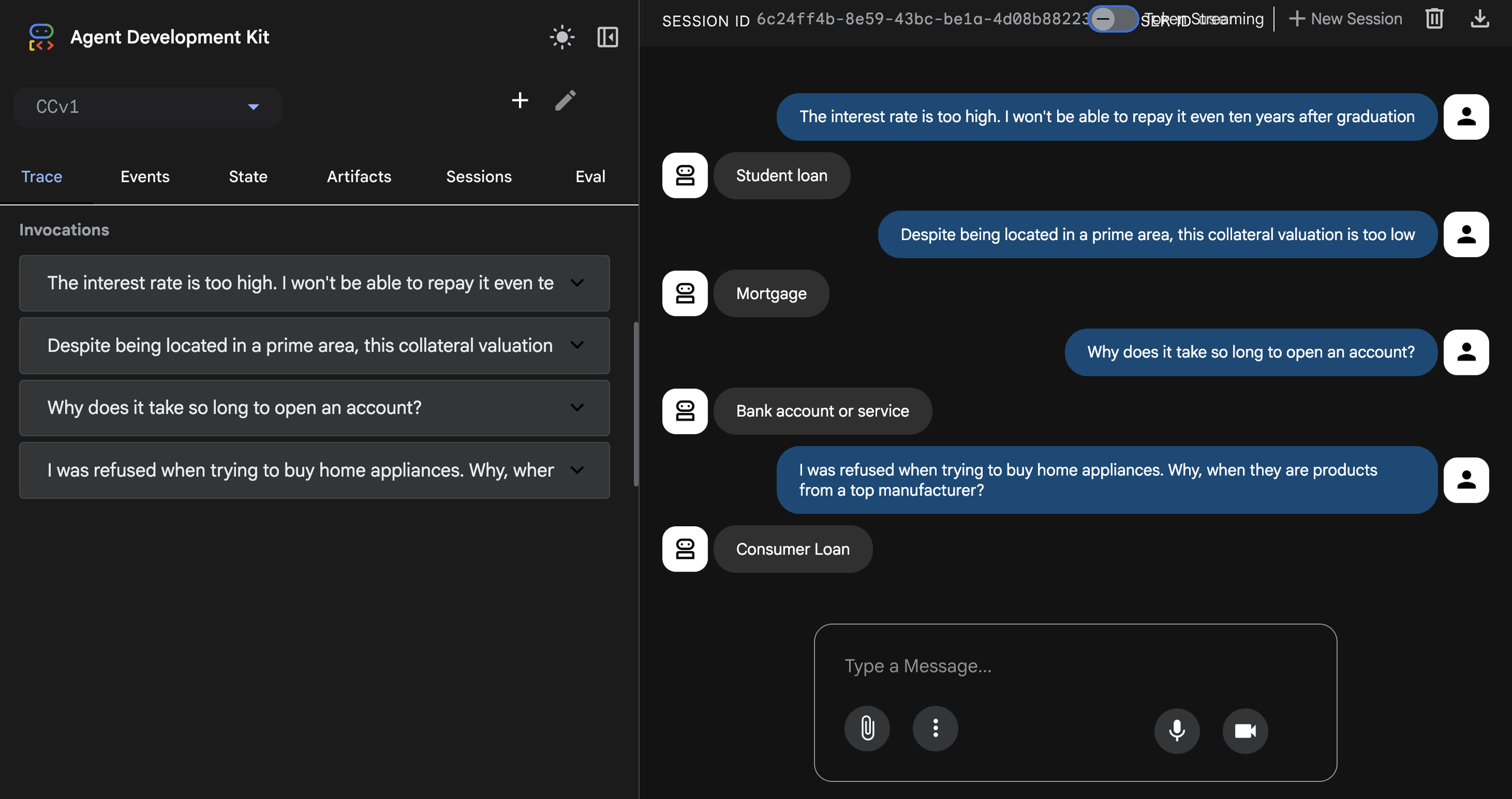
The screenshot above shows the "Bank Complaint Classification App" I developed. I verified its accuracy with some simple examples, and the results were excellent. It seems the internal prompts within the app were generated very effectively. Impressive work!


3. Summary of Building a Complaint Classification App with ADK

  • Total Time: 6 hours (starting from the Antigravity installation) to complete the app.

  • Execution: With the finalized prompt, the run time is just over a minute.

  • Manual Effort: The actual coding for Google ADK to make the app is only about a 20-minute task if done manually without vibe-coding.

  • Reasons for the Delay:

    • I had to iterate on the prompts several times because Gemini 3 is still unfamiliar with Google ADK

    • I had to explicitly instruct it on file structures and code syntax.

    • I was also using Antigravity for the first time.

  • Conclusion: It is manageable once you understand Gemini 3 Pro's behavior regarding Google ADK.


So, what do you think?

It took a little longer because I wasn't used to the new IDE yet, but the combination of Gemini 3.0 Pro and Antigravity was outstanding. I could really feel its high potential. Since the execution speed itself is fast, next time I plan to challenge myself by "Vibe Coding" a multi-agent app. Look forward to it! That's all for today. Stay tuned!


You can enjoy our video news ToshiStats-AI from this link, too!


1) Experience liftoff with the next-generation IDE, Google,  19 Nov 2025


Copyright © 2025 Toshifumi Kuga. All right reserved

Notice: ToshiStats Co., Ltd. and I do not accept any responsibility or liability for loss or damage occasioned to any person or property through using materials, instructions, methods, algorithms or ideas contained herein, or acting or refraining from acting as a result of such use. ToshiStats Co., Ltd. and I expressly disclaim all implied warranties, including merchantability or fitness for any particular purpose. There will be no duty on ToshiStats Co., Ltd. and me to correct any errors or defects in the codes and the software.