Machine Learning

Improving ML Vibe Coding Accuracy: Hands-on with Claude Code's Plan Mode

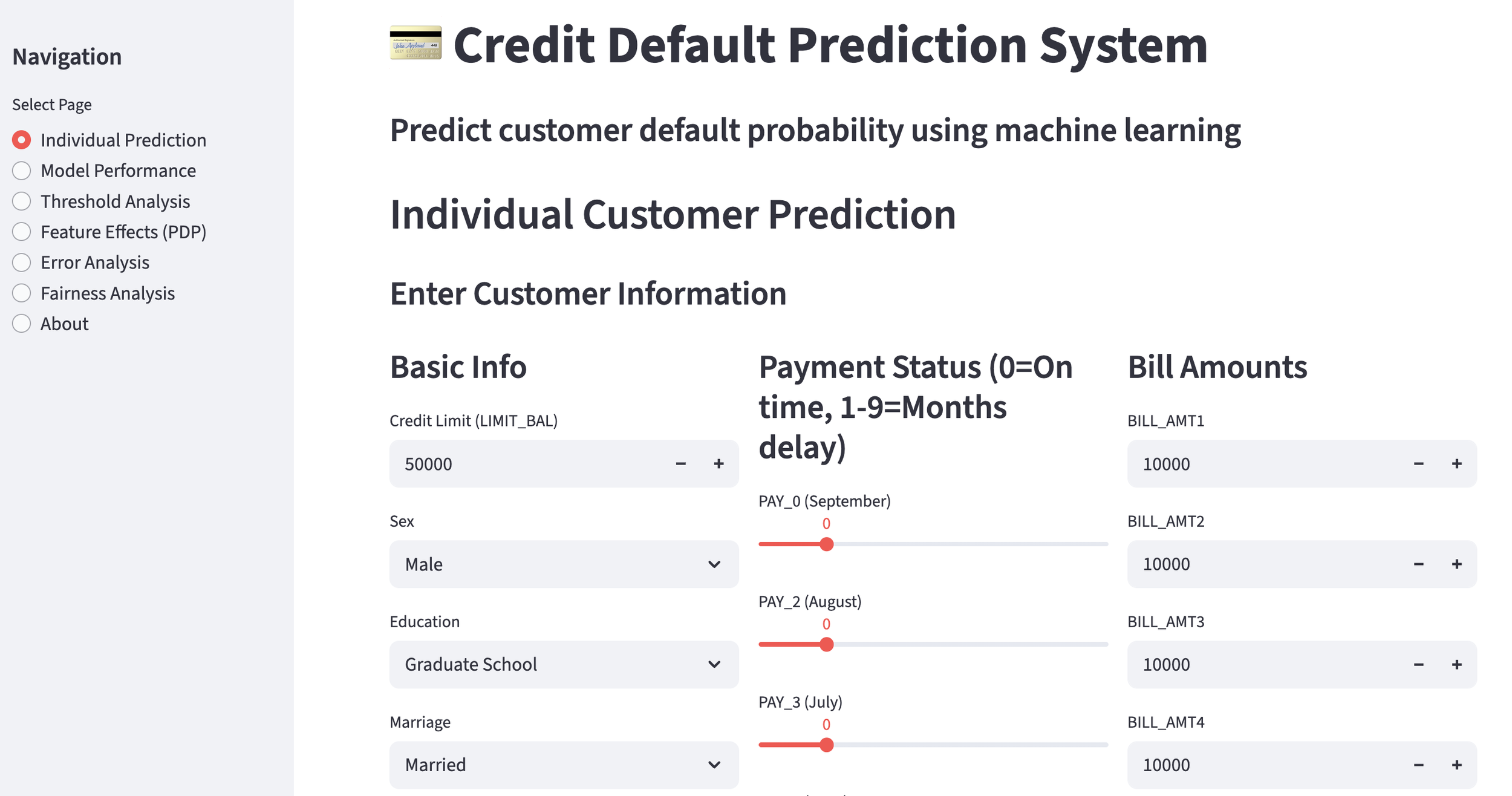
2025 was a year where I actively incorporated "Vibe Coding" into machine learning. After repeated trials, I encountered situations where coding accuracy was inconsistent—sometimes good, sometimes bad.

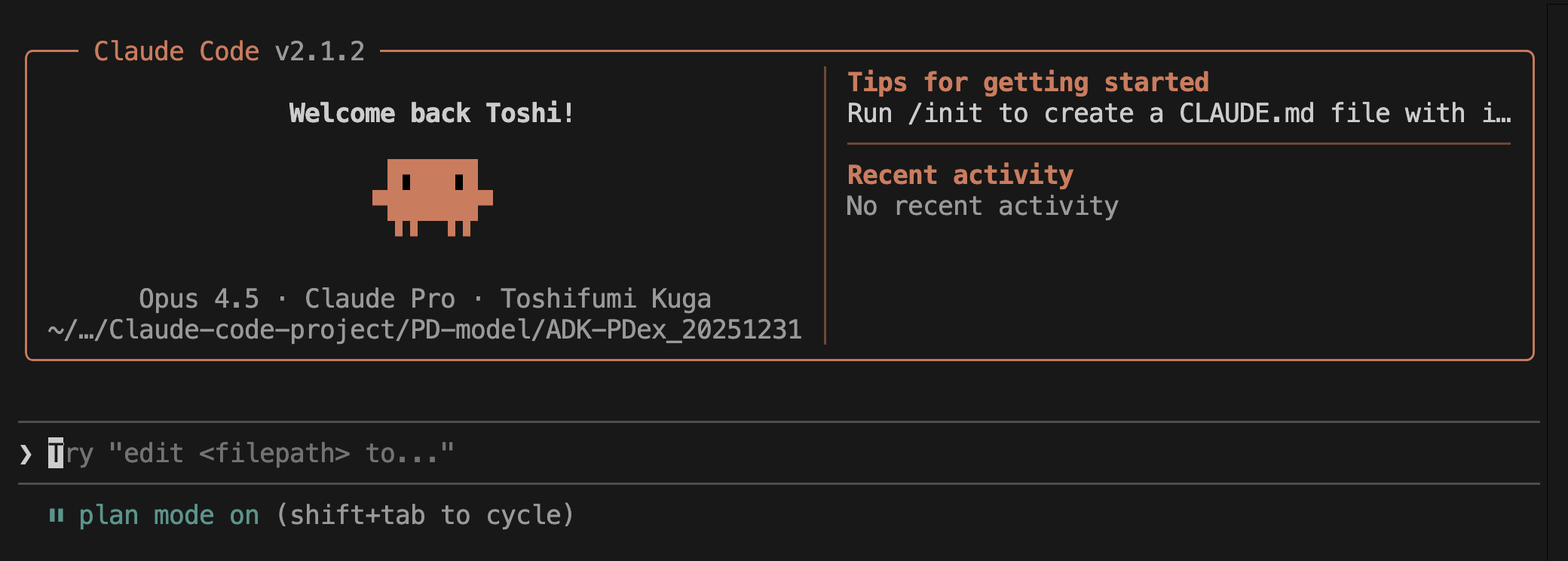
Therefore, in this experiment, I decided to use Claude Code "Plan Mode" (1) to automatically generate an implementation plan via an AI agent before generating the actual code. Based on this plan, I will attempt to see if a machine learning model can be built stably using "Vibe Coding." Let's get started!


1. Generating an Implementation Plan with Claude Code "Plan Mode"

Once again, I would like to build a model that predicts in advance whether a customer will default (on a loan, etc.). I will use publicly available credit card default data (2). For the code assistant, I am using Claude Code, and for the IDE, the familiar VS Code.

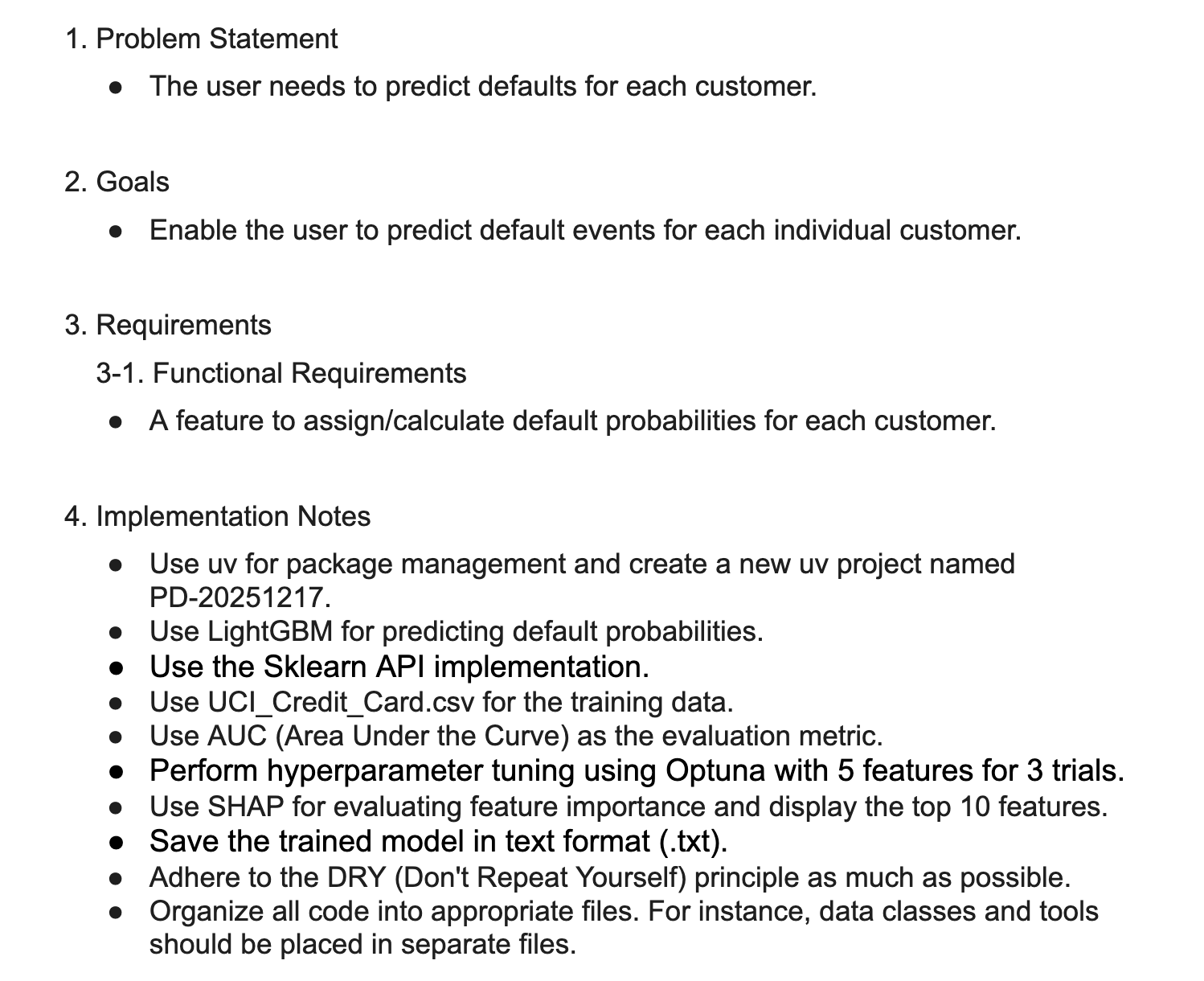
To provide input to the Claude Code AI agent, I summarized the task and implementation points into a "Product Requirement Document (PRD)." This is the only document I created.

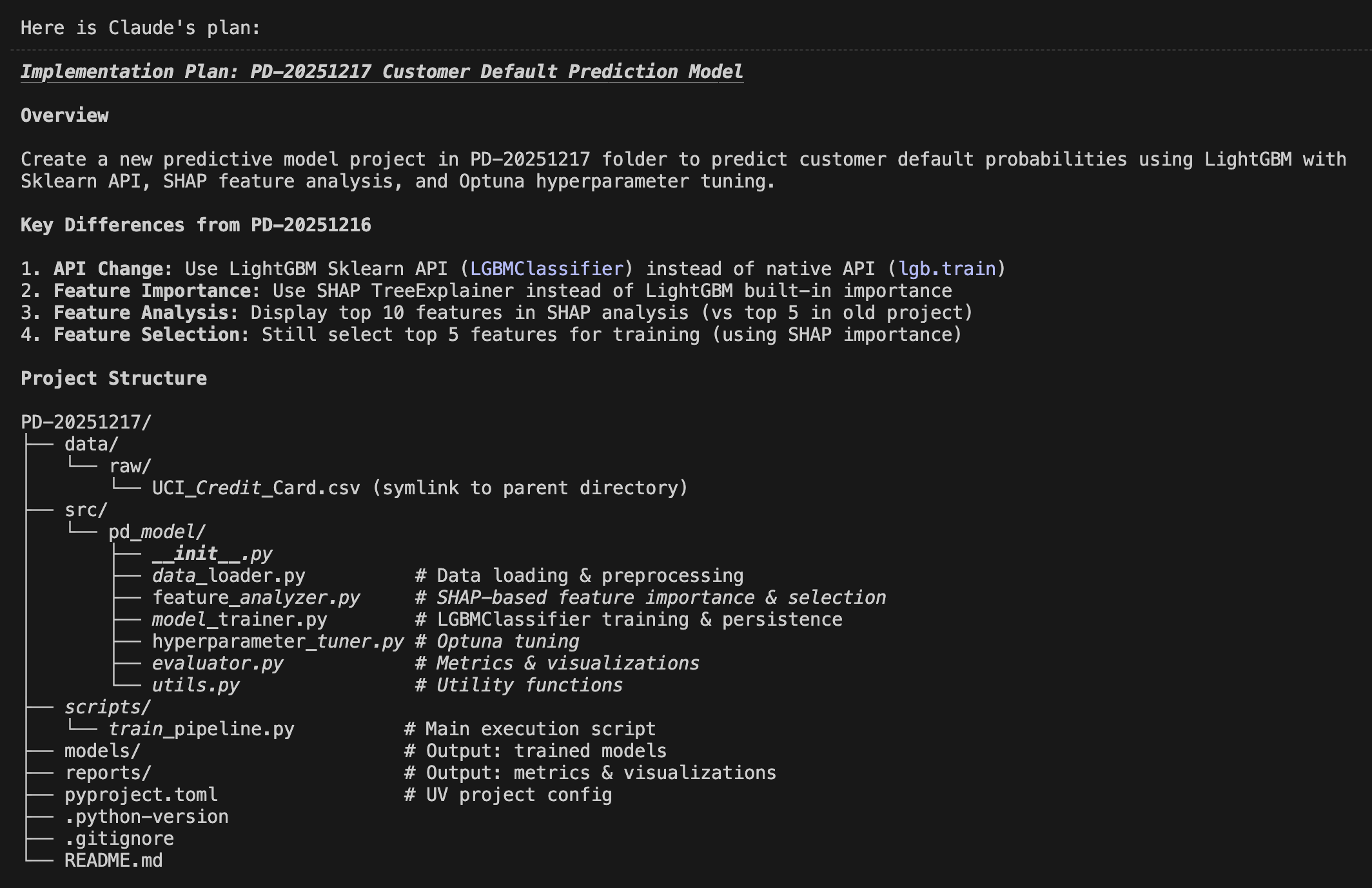
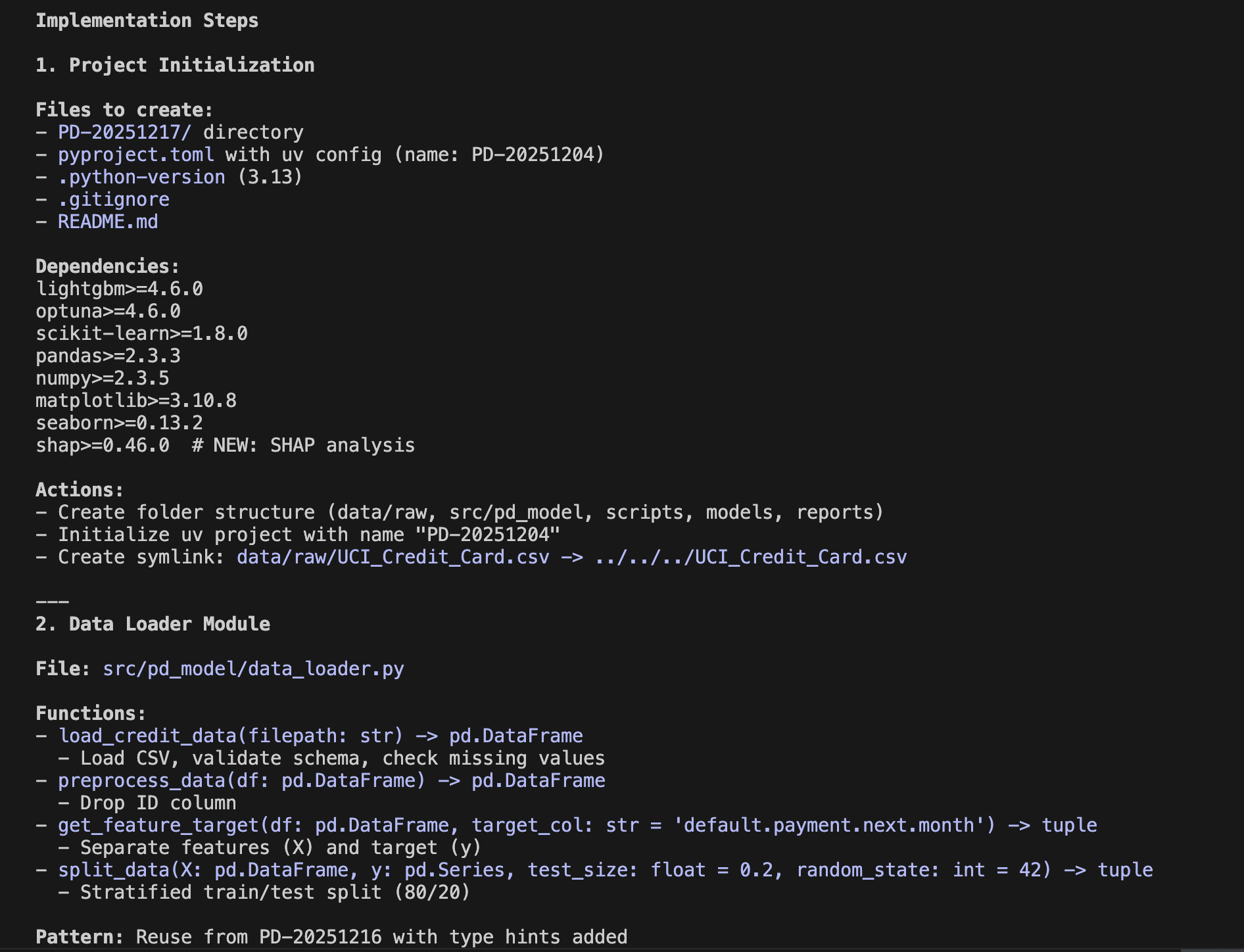
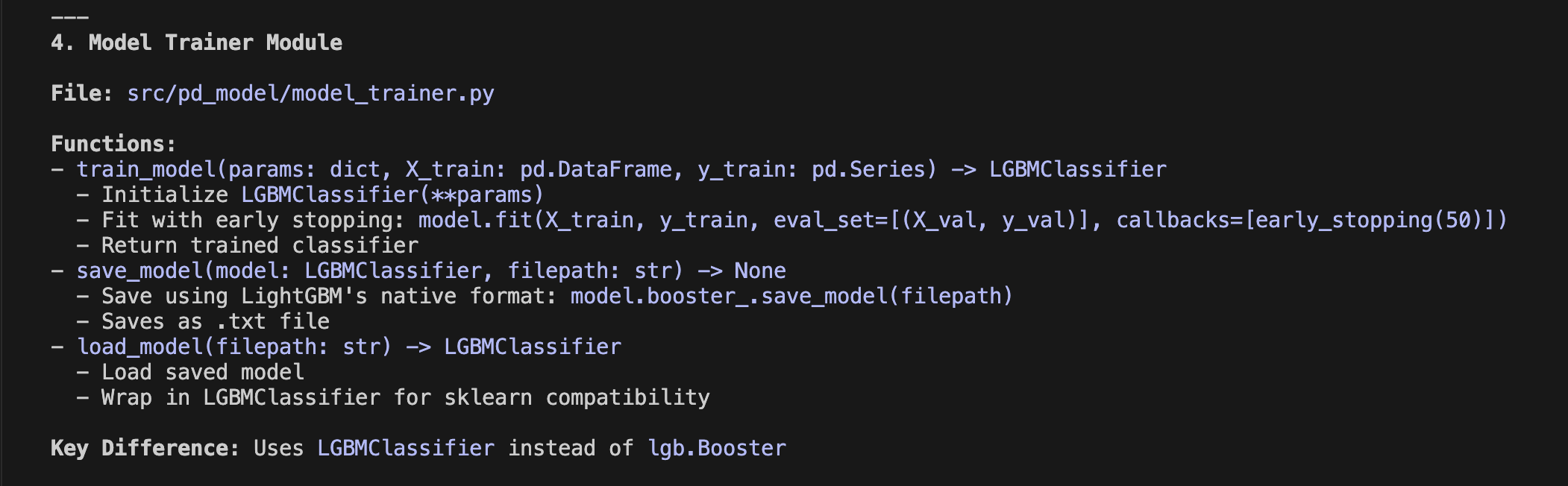
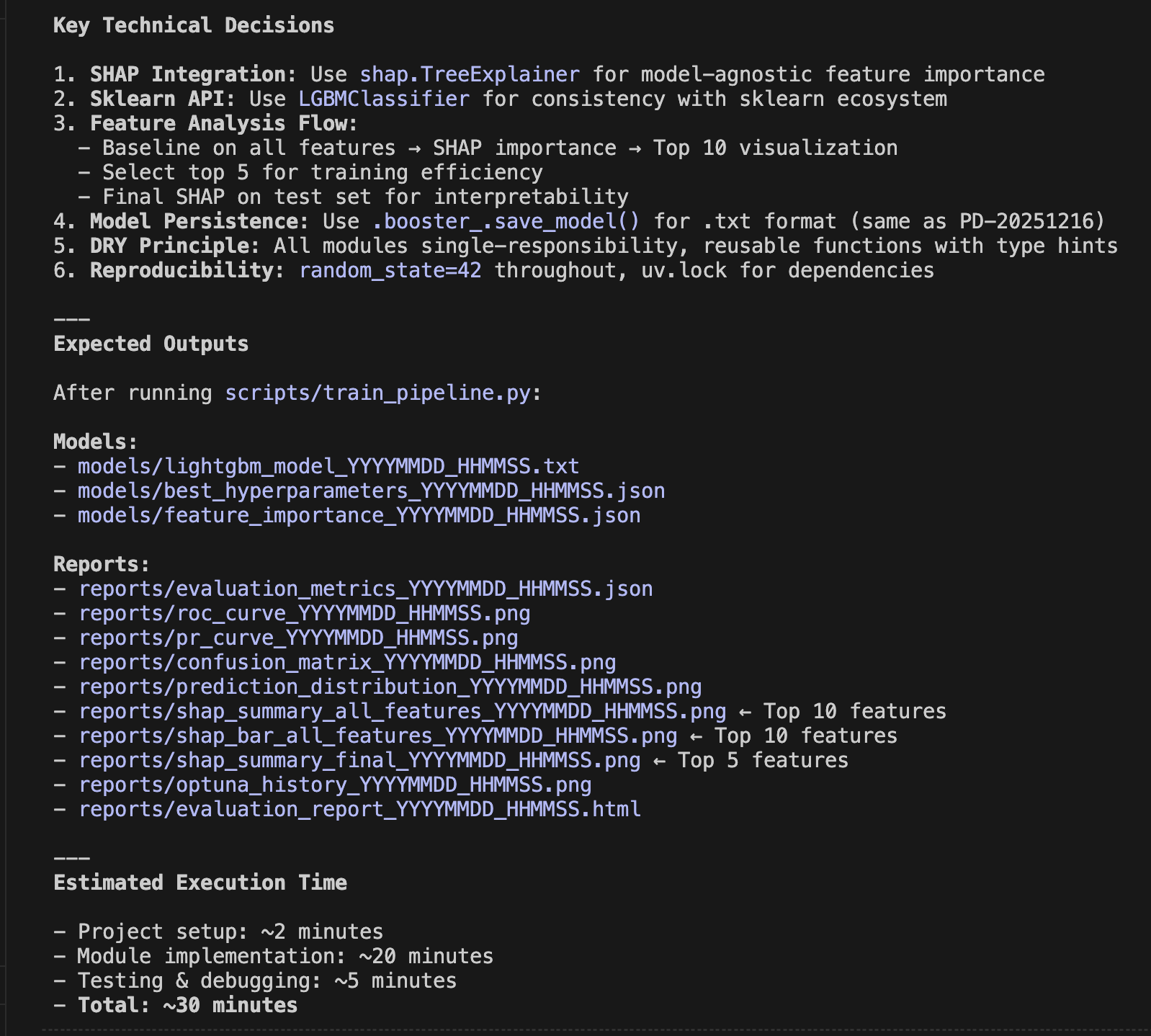
I input this PRD into Claude Code "Plan Mode" and instructed it to: "Create a plan to create predictive model under the folder of PD-20251217".

Within minutes, the following implementation plan was generated. Comparing it to the initial PRD, you can see how refined it is. Note that I am only showing half of the actual plan generated here—a truly detailed plan was created. I can only say that the ability of the AI agent to envision this far is amazing.


2. Beautifully Visualizing Prediction Accuracy

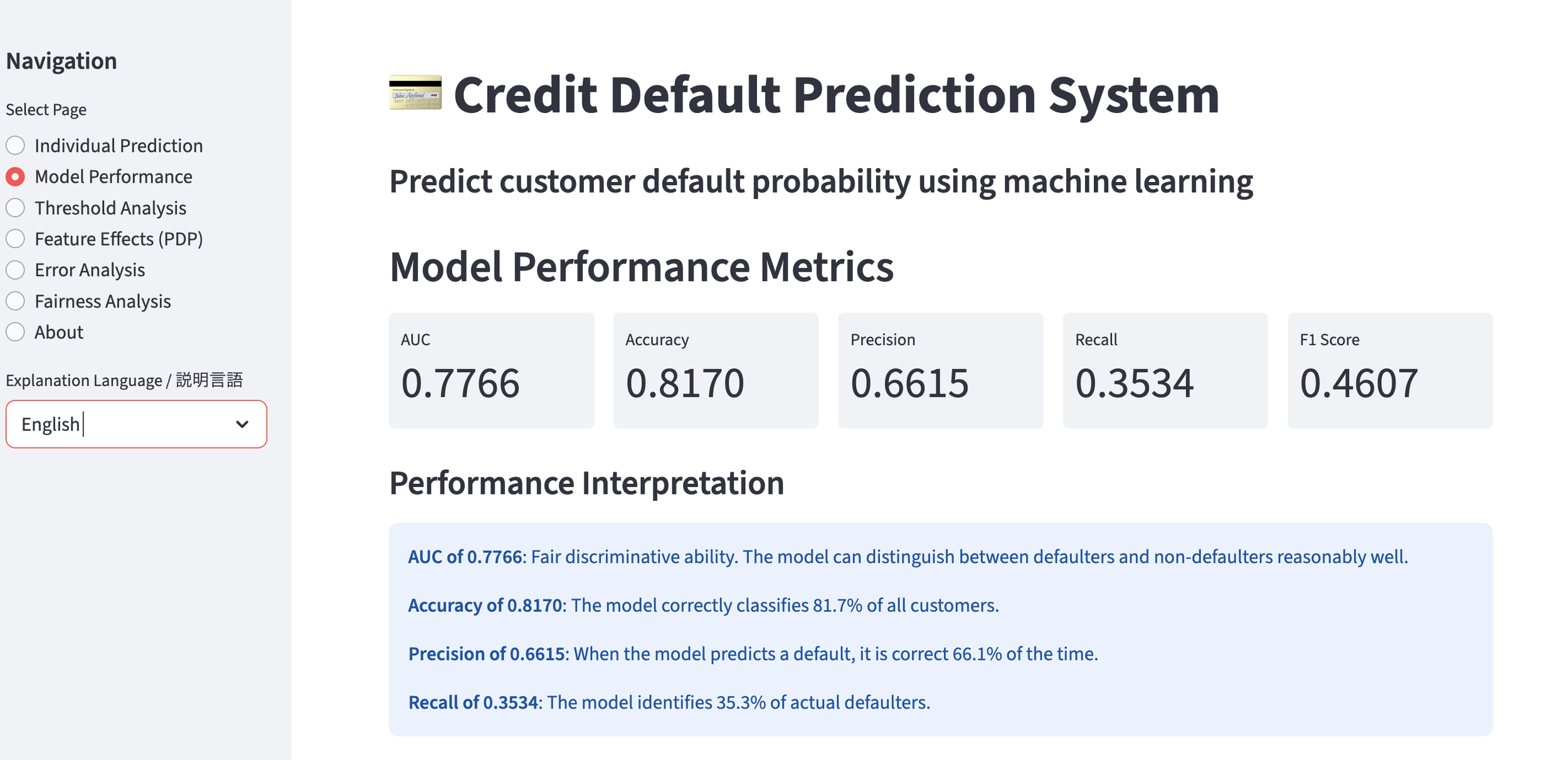
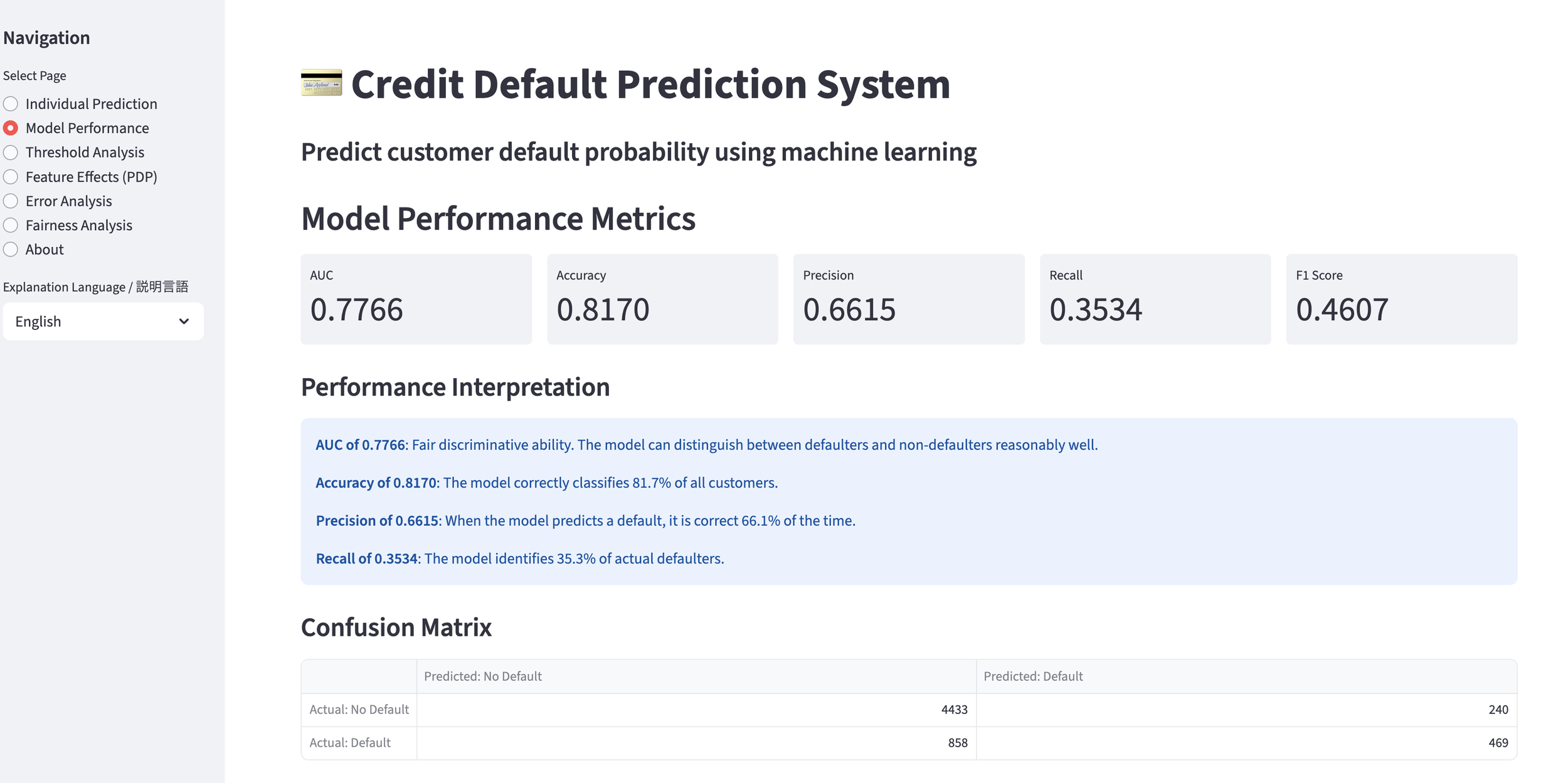
When this implementation plan is approved and executed, the prediction model is generated. Naturally, we are curious about the accuracy of the resulting model.

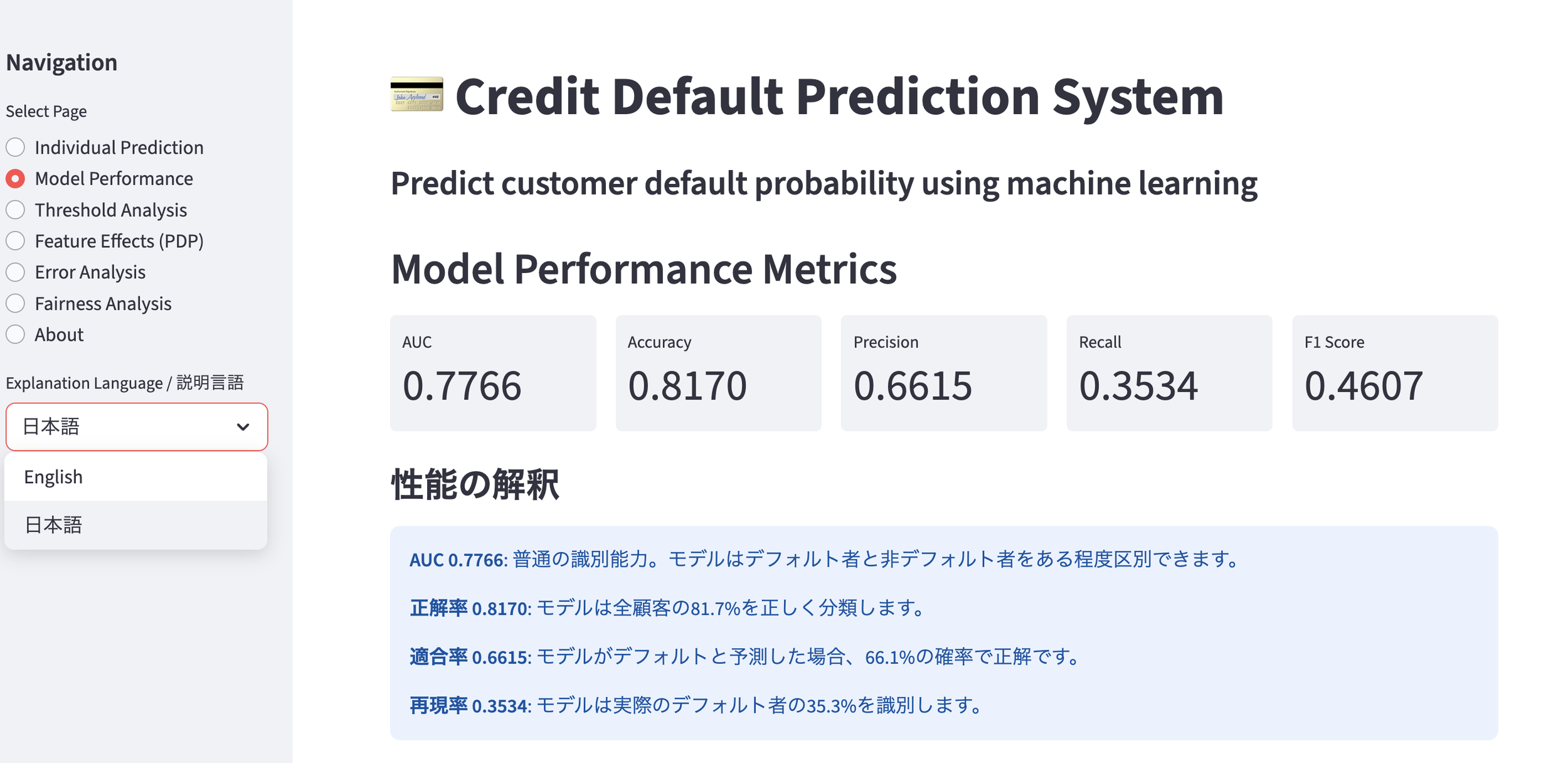
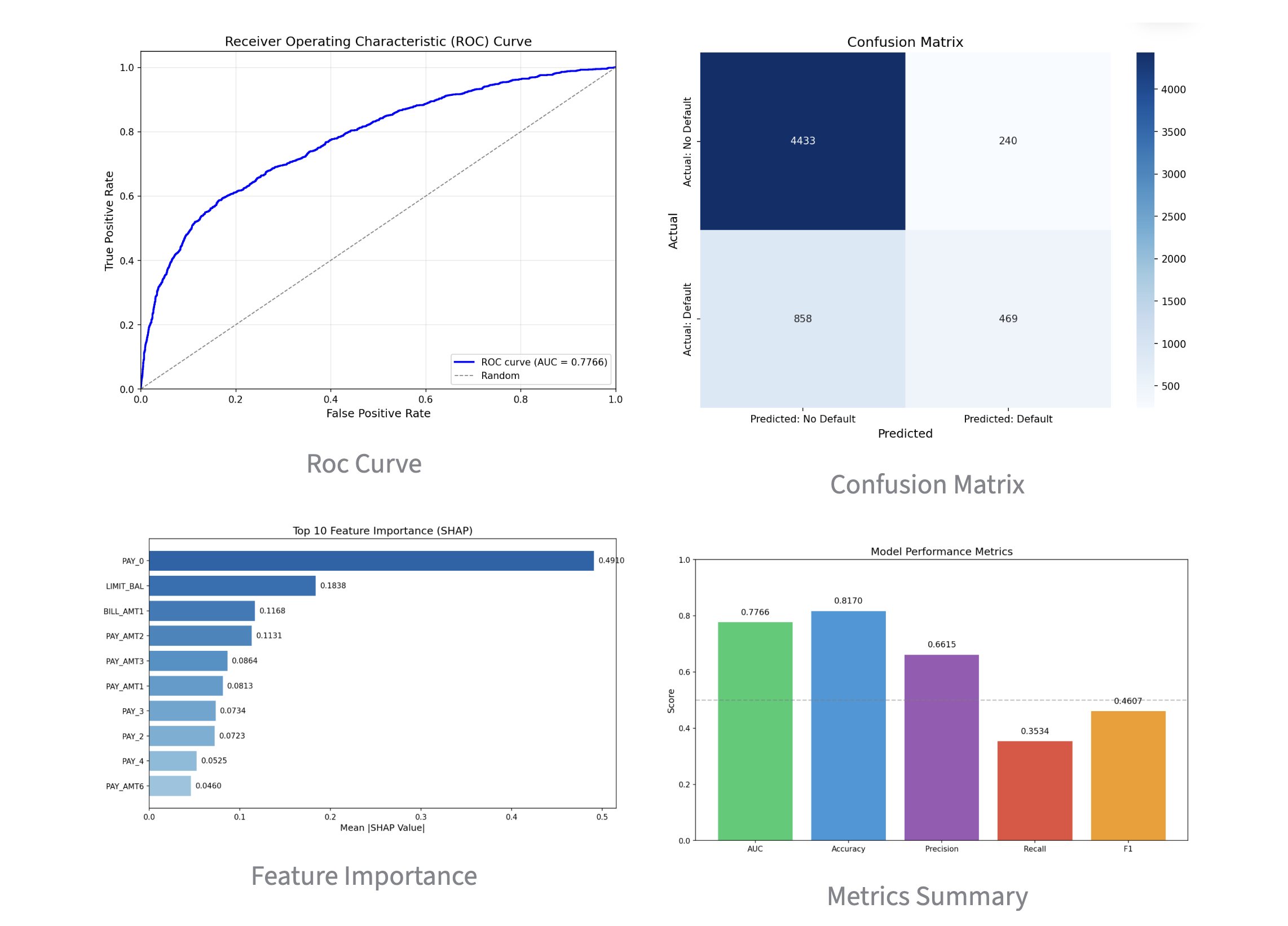
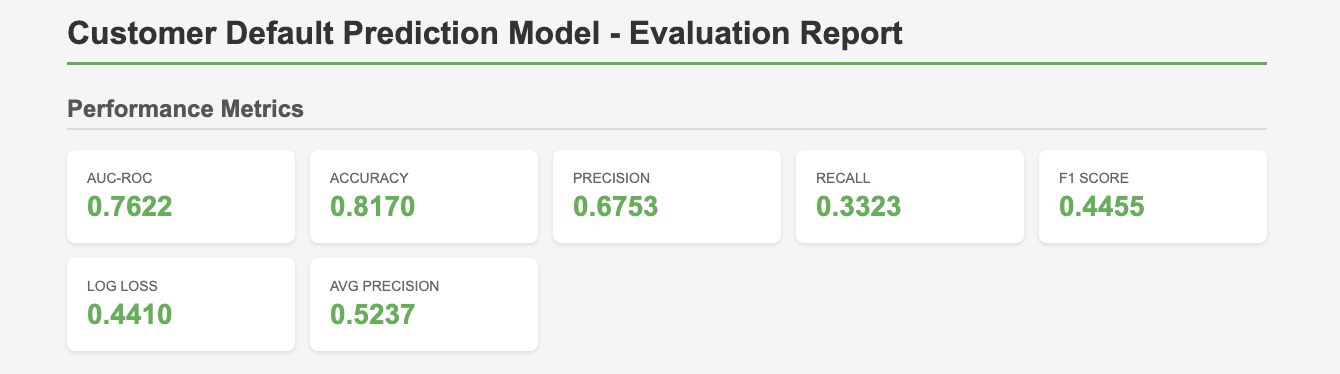
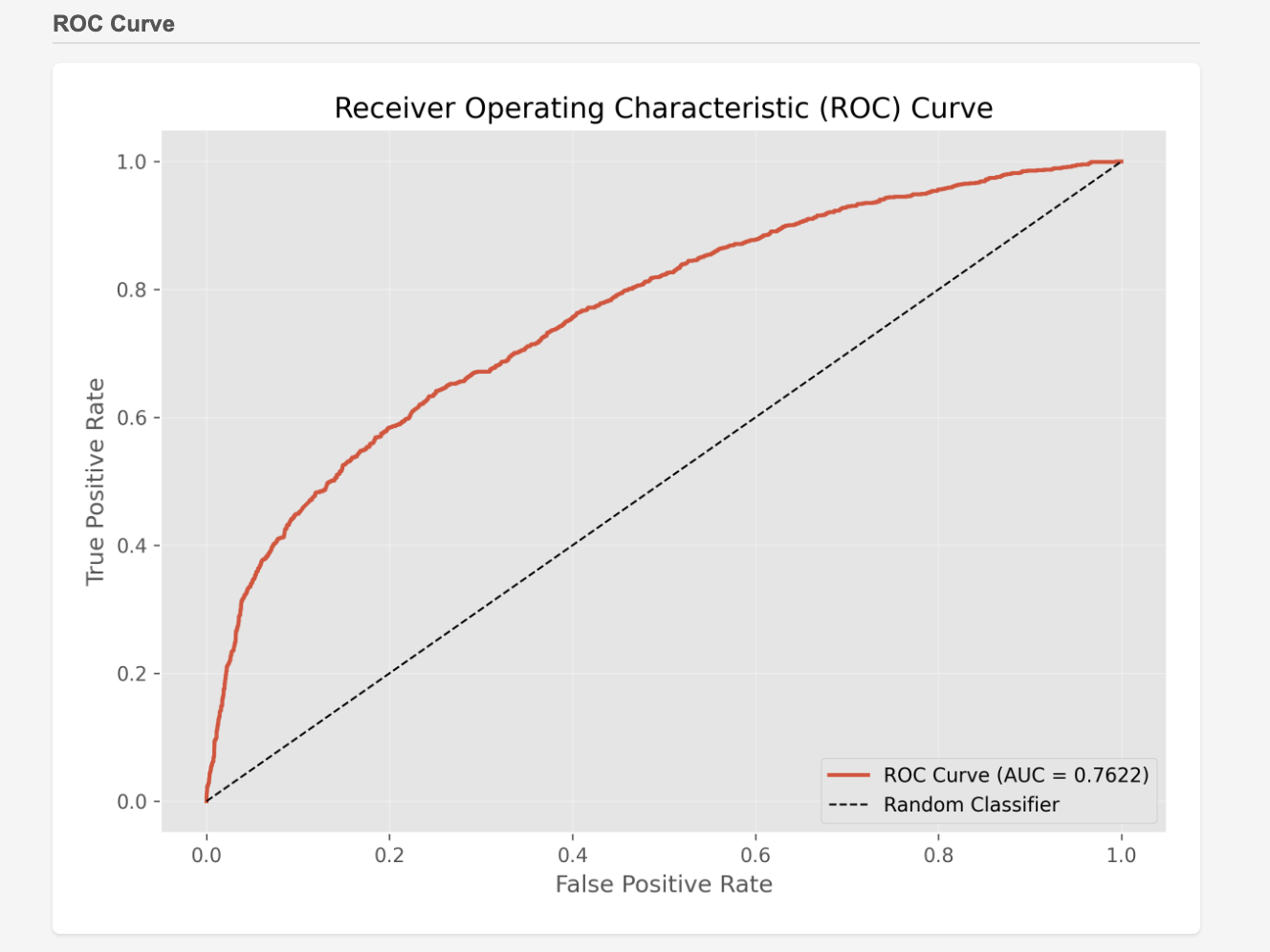
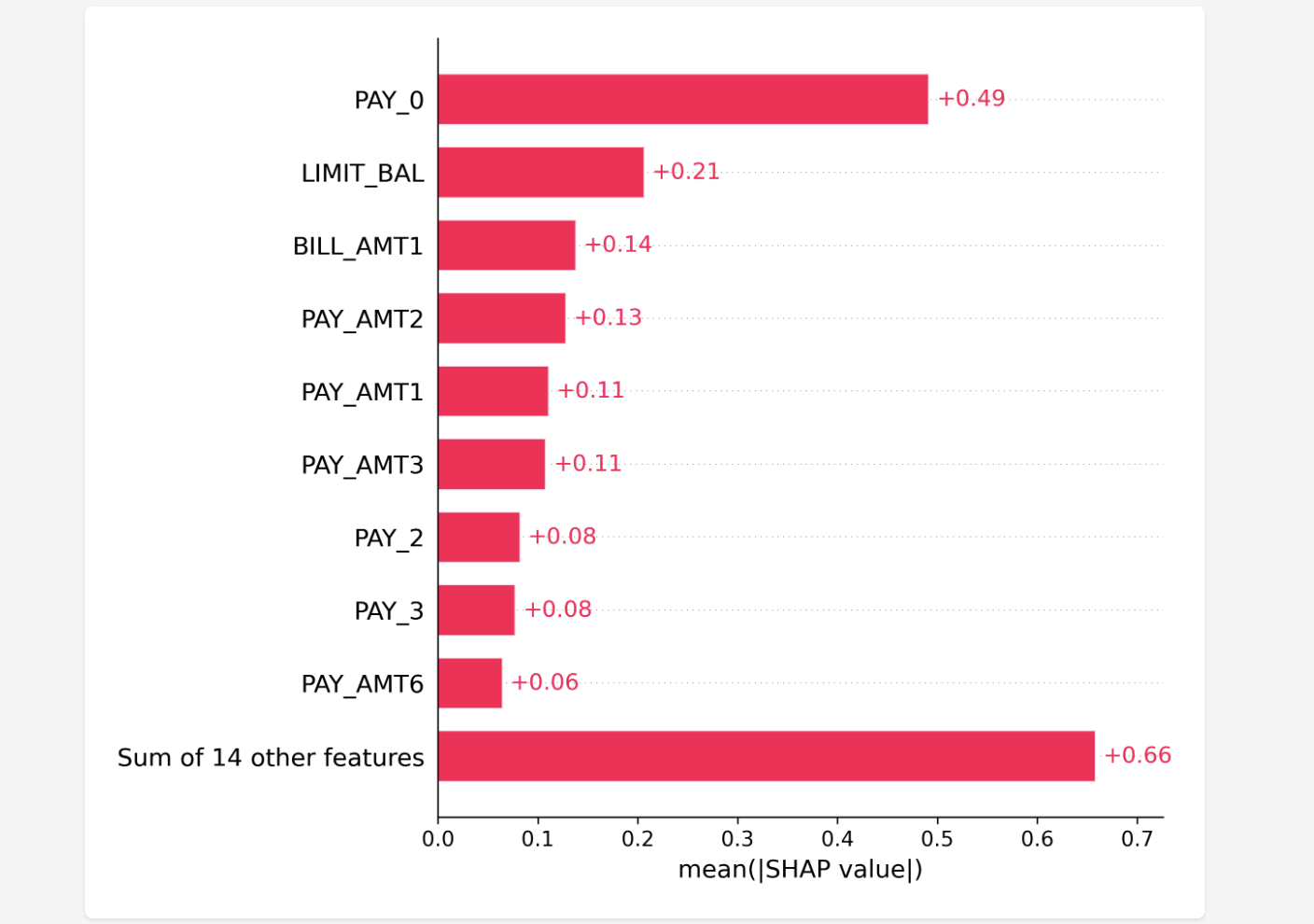
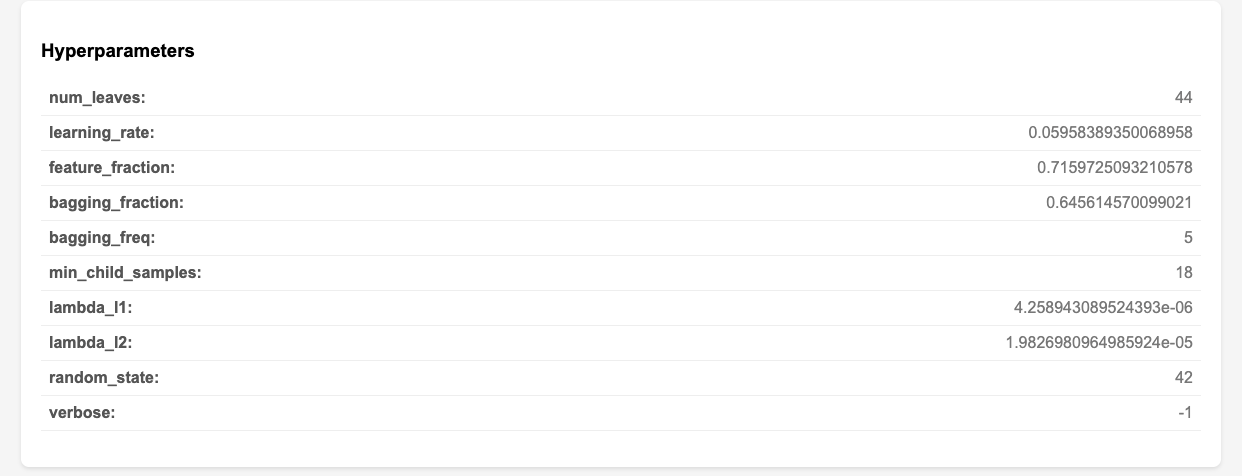
Here, it is visualized clearly according to the implementation plan. While these are familiar metrics for machine learning experts, all the important ones are covered and visualized in an easy-to-understand way, summarized as a single HTML file viewable in a browser.

The charts below are excerpts from that file. It includes ROC curves, SHAP values, and even hyperparameter tuning results. This time, the total implementation time was about 10 minutes. If it can be generated automatically to this extent in that amount of time, I’d rather leave it to the AI agent.


3. Meta-Prompting with Claude Code "Plan Mode"

A Meta-Prompt refers to a "prompt (instruction to AI) used to create and control prompts."

In this case, I called Claude Code "Plan Mode" and instructed it to "generate an implementation plan" based on my PRD. This is nothing other than executing a meta-prompt in "Plan Mode."

Thanks to the meta-prompt, I didn't have to write a detailed implementation plan myself; I only needed to review the output. It is efficient because I can review it before coding, and since that implementation plan can be viewed as a highly precise prompt, the accuracy of the actual coding is expected to improve.

To be honest, I don't have the confidence to write the entire implementation plan myself. I definitely want to leave it to the AI agent. It has truly become convenient!


How was it? Generating implementation plans with Claude Code "Plan Mode" seems applicable not only to machine learning but also to various other fields and tasks. I definitely intend to continue trying it out in the future. I encourage everyone to give it a challenge as well.

That’s all for today. Stay tuned!


You can enjoy our video news ToshiStats-AI from this link, too!

1) How to use Plan Mode,  Anthropic

2) Default of Credit Card Clients


Copyright © 2025 Toshifumi Kuga. All right reserved
Notice: ToshiStats Co., Ltd. and I do not accept any responsibility or liability for loss or damage occasioned to any person or property through using materials, instructions, methods, algorithms or ideas contained herein, or acting or refraining from acting as a result of such use. ToshiStats Co., Ltd. and I expressly disclaim all implied warranties, including merchantability or fitness for any particular purpose. There will be no duty on ToshiStats Co., Ltd. and me to correct any errors or defects in the codes and the software.
Can You "Vibe Code" Machine Learning? I Tried It and Built an App

2025 was the year the coding style known as "Vibe Coding" truly gained mainstream acceptance. So, for this post, I conducted an experiment to see just how far we could go in building a machine learning model using only AI agents via "Vibe Coding"—with almost zero human programming involved. Let's get started!

 
  1. The Importance of the "Product Requirement Document" for Task Description

This time, I wanted to build a model that predicts whether bank loan customers will default. I used the publicly available Credit Card Default dataset (1).

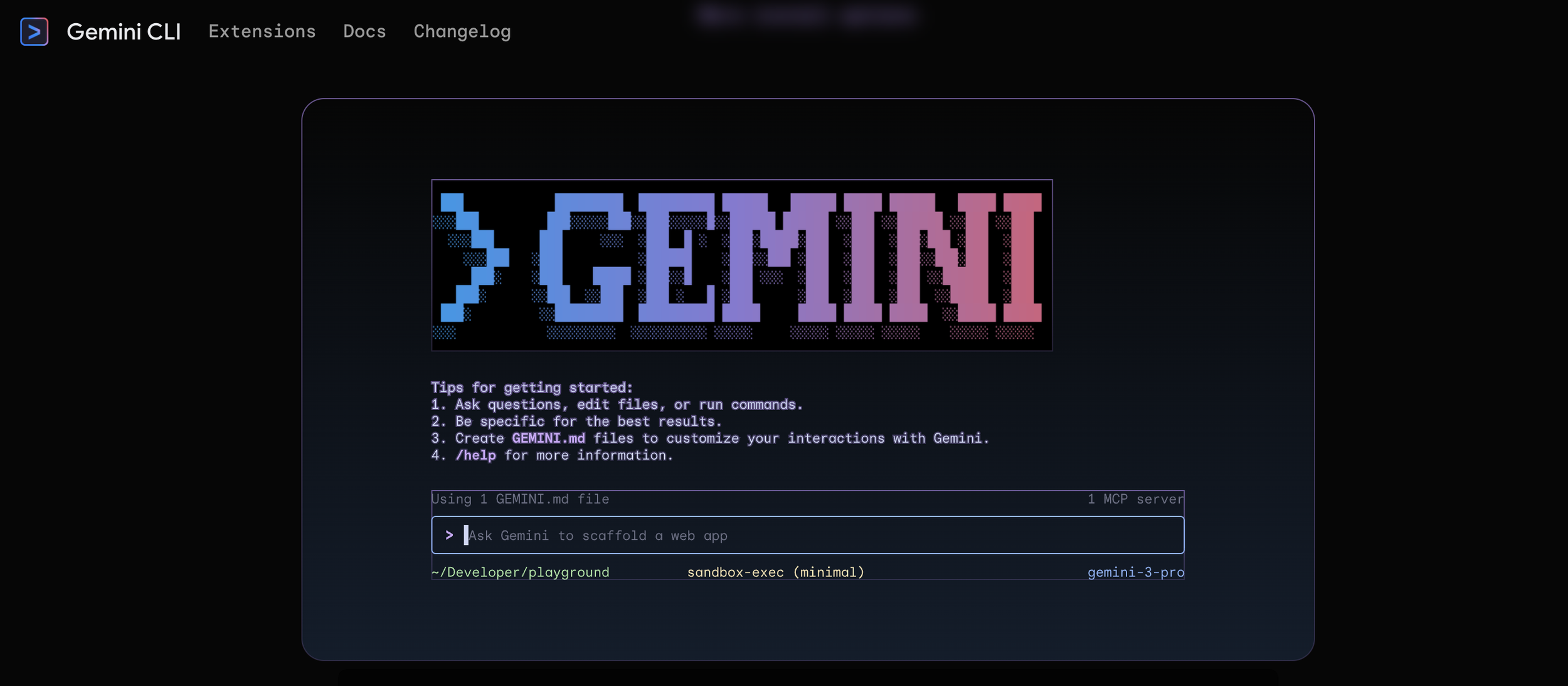
In Vibe Coding, we delegate the actual writing of the program to the AI agent, while the human shifts to a reviewer role. In practice, having a tool called a "Code Assistant" is very convenient. For this experiment, I used Google's Gemini CLI. For the IDE, I used the familiar VS Code.

Gemini CLI

To entrust the coding to an AI agent, you must teach it exactly what you want it to do. While it is common to enter instructions as prompts in a chatbot, in Vibe Coding, we want to use the same prompts repeatedly, so we often input them as Markdown files.

It is best to use what is called a "Product Requirement Document (PRD)" for this content. You summarize the goals you want the product to achieve, the libraries you want to use, etc. The PRD I created this time is as follows:

PRD

By referencing this PRD and entering a prompt to create a default prediction model, the model was built in just a few minutes. The evaluation metric, AUC, was also excellent, ranging between 0.74 and 0.75. Amazing!!


2. Describing the Folder Structure with PROJECT_SUMMARY

It is wonderful that the machine learning model was created, but if left as is, we won't know which files are where, and handing it over to a third party becomes difficult.

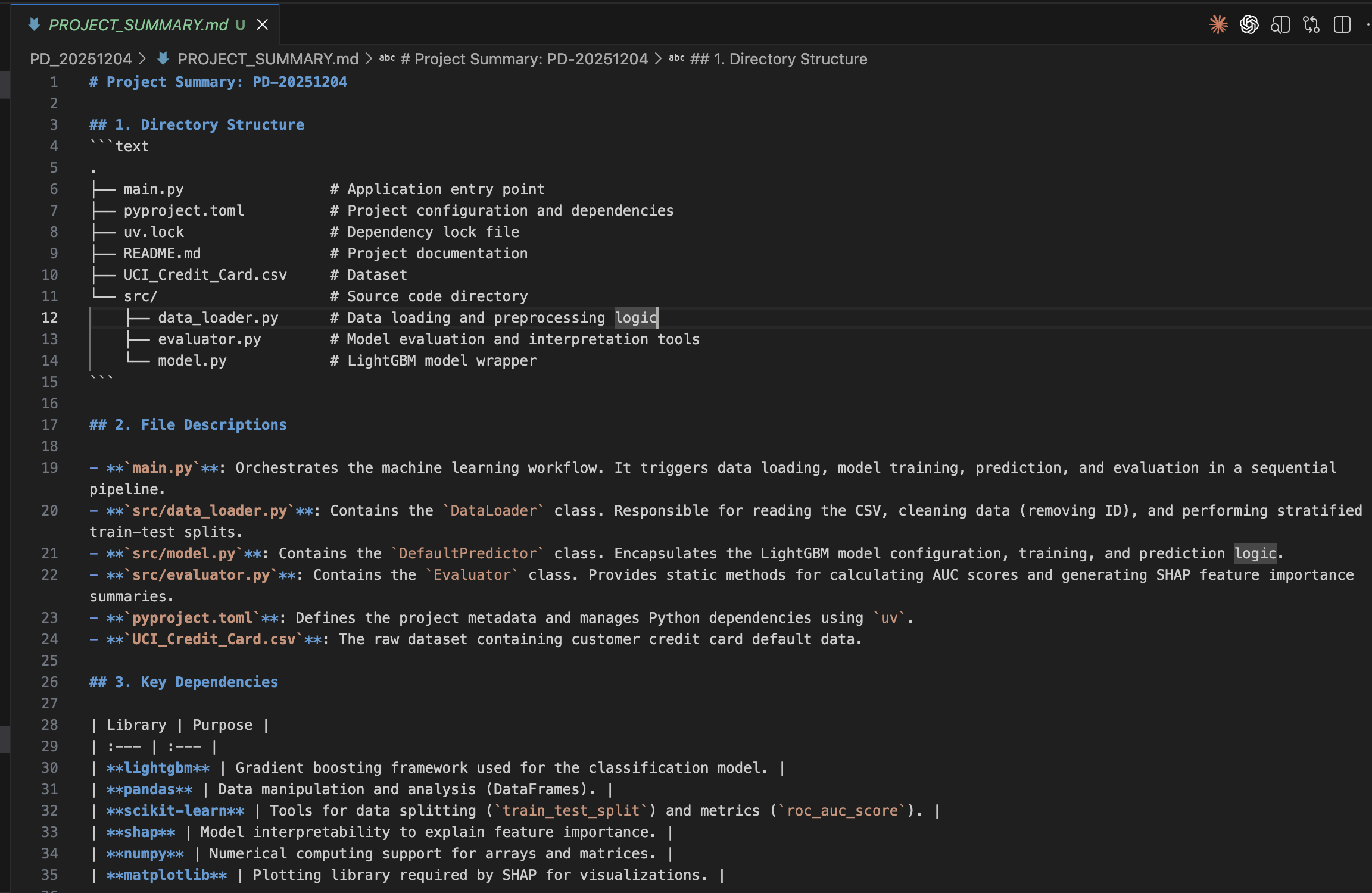
Therefore, if you input the prompt: "Analyze the current directory structure and create a concise summary that includes: 1. A tree view of all files 2. Brief description of what each file does 3. Key dependencies and their purposes 4. Overall architecture pattern Save this as PROJECT_SUMMARY.md", it will create a Markdown file like the one below for you.

PROJECT_SUMMARY.md

With this, anyone can understand the folder structure at any time, and it is also convenient when adding further functional extensions later. I highly recommend creating a PROJECT_SUMMARY.md.


3. Adding a UI and Turning the ML Model into an App

Since we built such a good model, we want people to use it. So, I experimented to see if I could build an app using Vibe Coding as well.

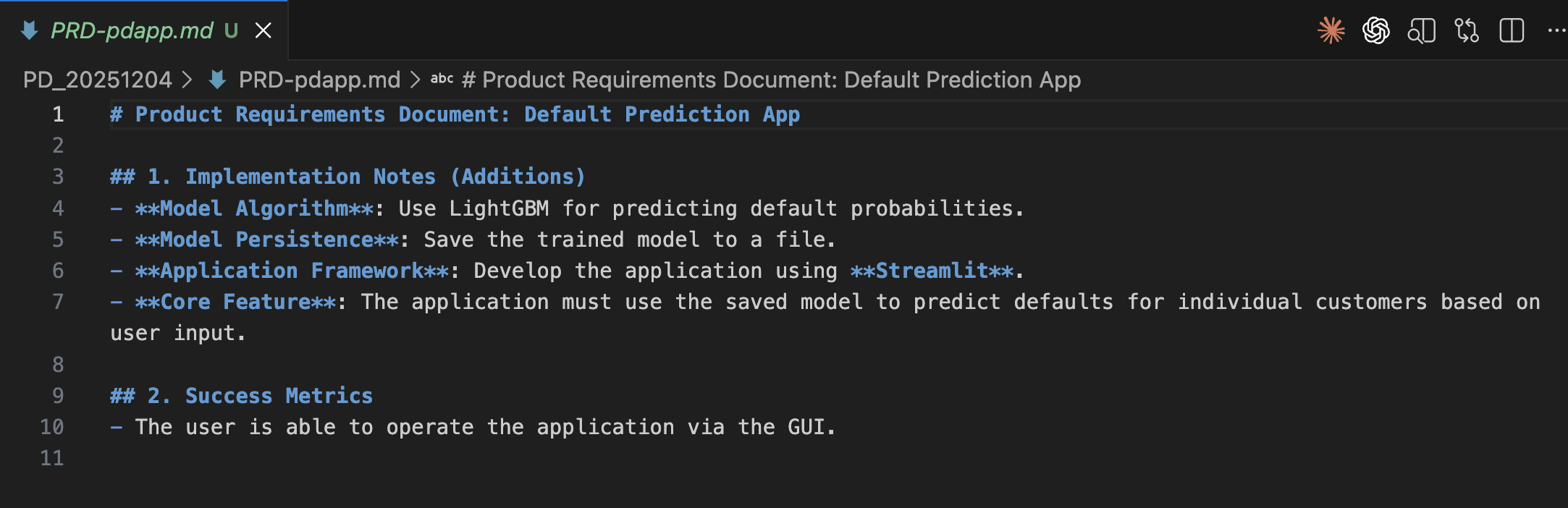
I created PRD-pdapp.md and asked the AI agent to build the app. I instructed it to save the model file and to use Streamlit for app development. The actual file and its translation are below:

PRD-pdapp.md

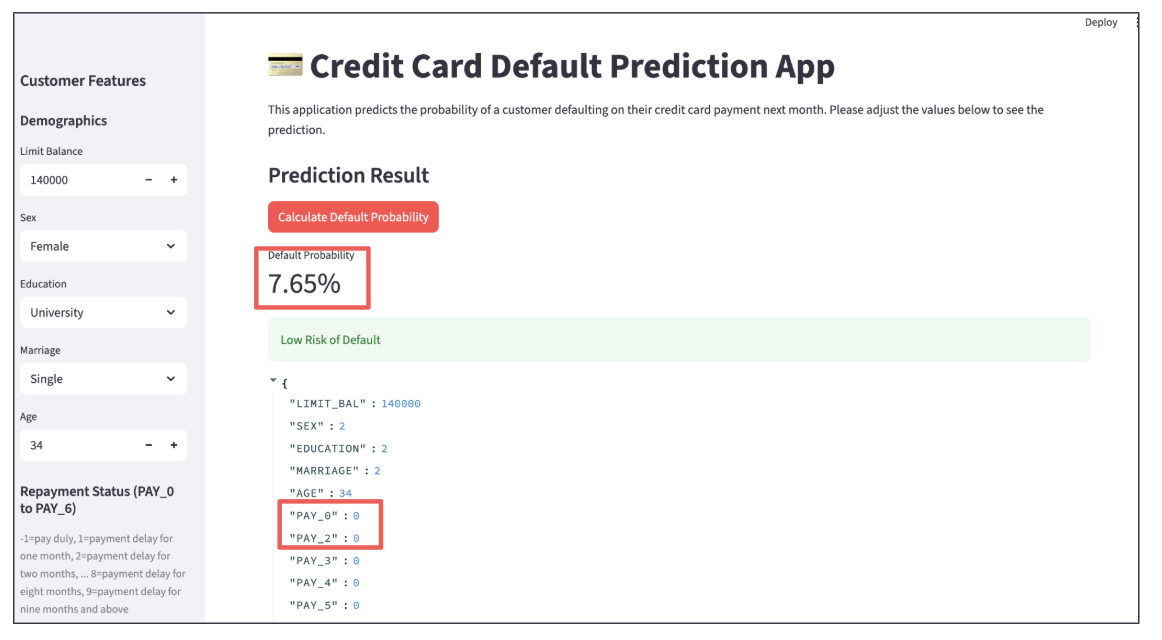
When executed, the following app was created. It looks cool, doesn't it?

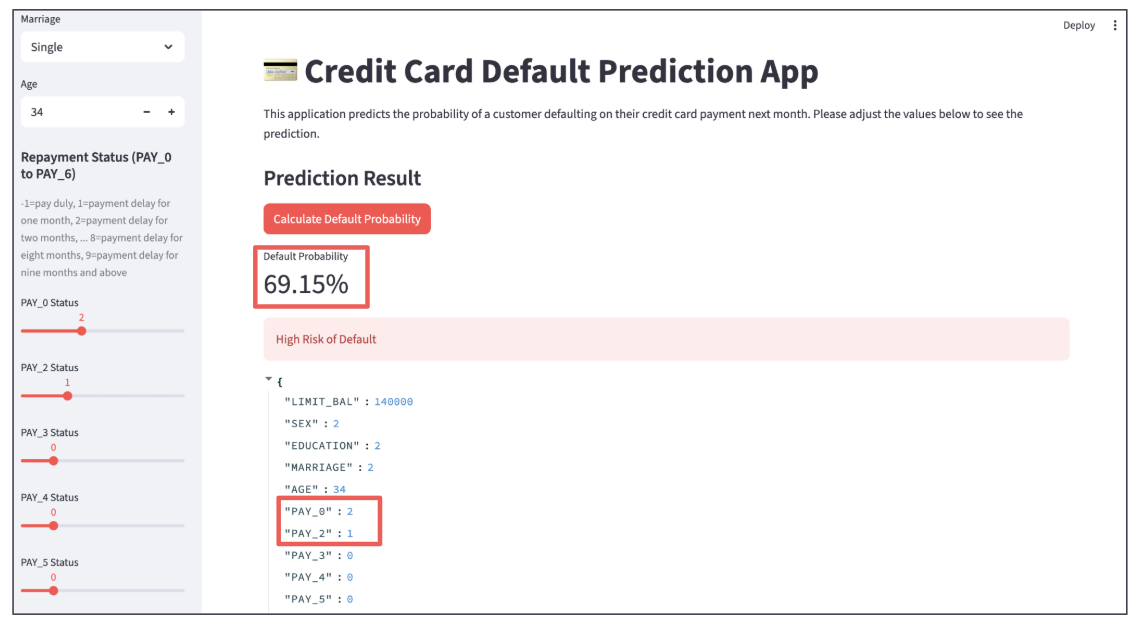
You can input customer data using the boxes and sliders on the left, and when you click the red button, the probability of default is calculated.

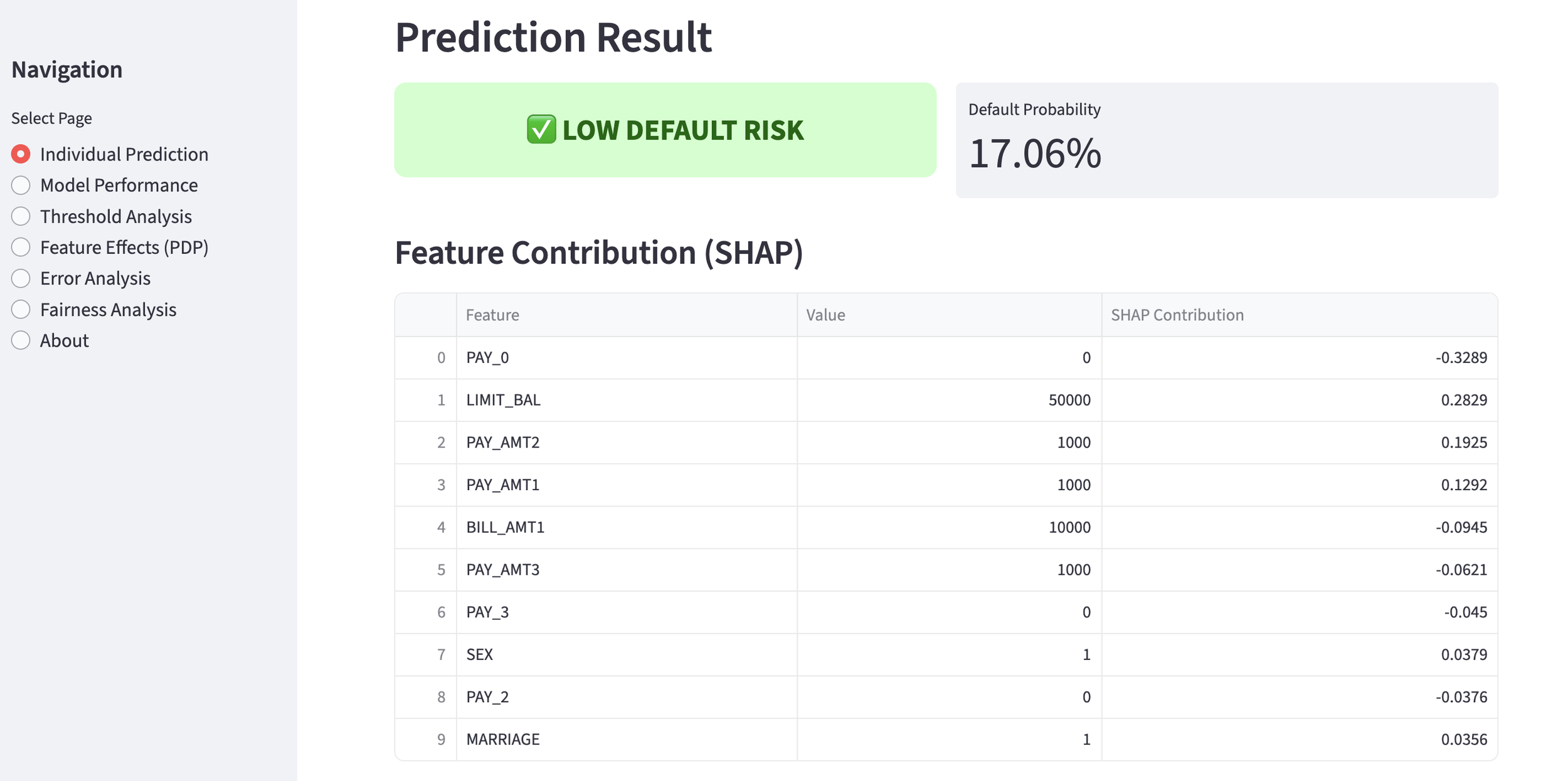
  • Customer 1: Default probability is 7.65%, making them a low-risk customer.

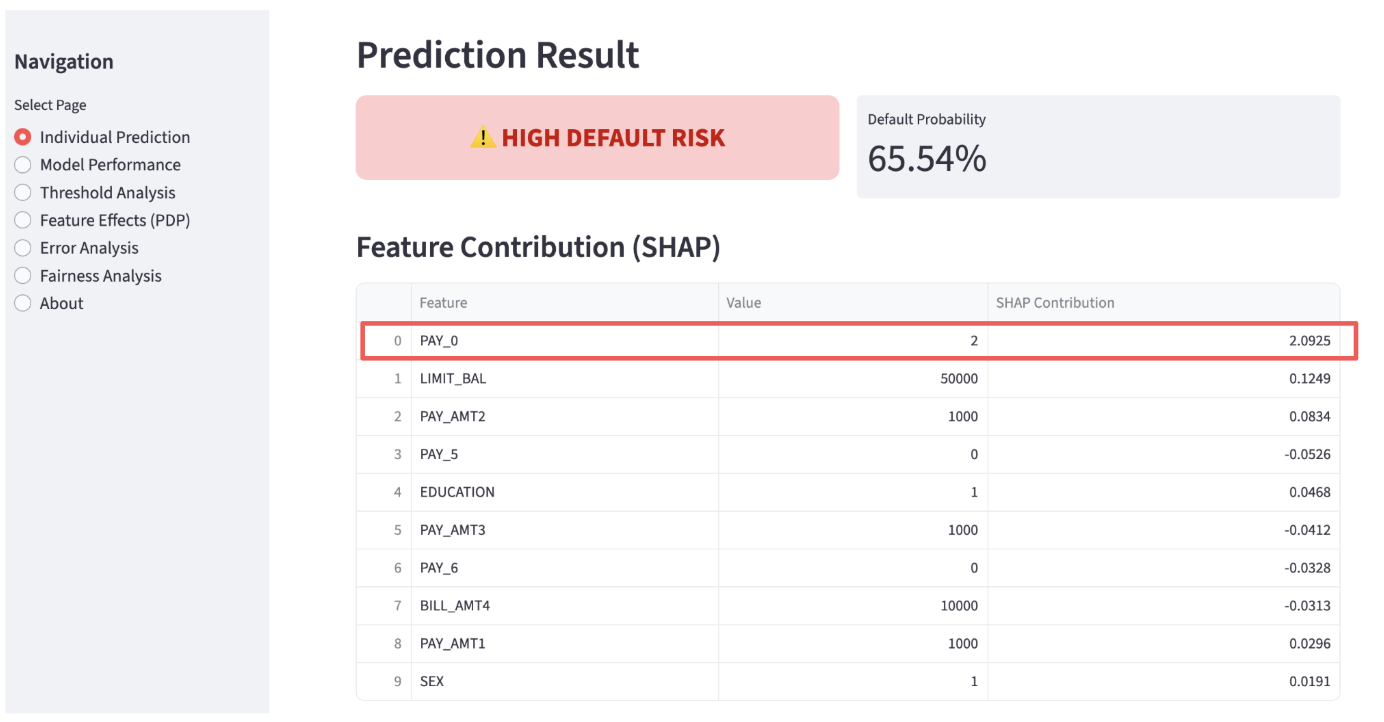
  • Customer 2: Default probability is 69.15%, which is high, so I don't think we can offer them a loan. The PAY_0 Status is "2", meaning their most recent payment status is 2 months overdue. This is the biggest factor driving up the default probability.

As you can see, having a UI is incredibly convenient because you can check the model's behavior by changing the input data. I was able to create an app like this using Vibe Coding. Wonderful.


How was it? It was indeed possible to perform machine learning using Vibe Coding. However, instead of programming code, you need to create precise PRDs. I believe this will become a new and crucial skill. I encourage you all to give it a try.

That’s all for today. Stay tuned!


You can enjoy our video news ToshiStats-AI from this link, too!

1) Default of Credit Card Clients


Copyright © 2025 Toshifumi Kuga. All right reserved
Notice: ToshiStats Co., Ltd. and I do not accept any responsibility or liability for loss or damage occasioned to any person or property through using materials, instructions, methods, algorithms or ideas contained herein, or acting or refraining from acting as a result of such use. ToshiStats Co., Ltd. and I expressly disclaim all implied warranties, including merchantability or fitness for any particular purpose. There will be no duty on ToshiStats Co., Ltd. and me to correct any errors or defects in the codes and the software.
The Secret to High-Accuracy AI: An Exploration of Machine Learning engineering agent

In a previous post, I explained Google's research paper, "MLE STAR" (1), and uncovered the mechanism by which an AI can build its own high-accuracy machine learning models. This time, I'm going to implement that AI agent using the Google ADK and experiment to see if it can truly achieve high accuracy. For reference, the MLE STAR code is available as open source (2).


1. The Information I Provided

With MLE STAR, humans only need to handle the data input and task definition. The data I used for this experiment comes from the Kaggle competition "Home Credit Default Risk" (3). While the original data consists of 8 files, I combined them into a single file for this experiment. I reduced the training data to 10% of the original, resulting in about 30,000 samples, and kept the original test data of 48,700 samples.

The task was set as follows: "A classification task to predict default." Note that to speed up the experiment, the number of iterative loops was set to a minimum.

                     Task Setup


2. Deciding Which Model to Use

MLE STAR uses a web search to select the optimal model for the given task. In this case, it ultimately chose LightGBM. To finish the experiment quickly, I configured it to select only one model. If I had set it to select two, it likely would have also chosen something like XGBoost. Both are models frequently used in data science competitions.

                Model Selection by MLE STAR

It generated the initial script below. As a frequent user of LightGBM, the code looks familiar, but the ability to generate it in an instant is something only an AI can do. It's amazing!


3. Identifying Key Code Blocks with "Ablation Studies"

Next, it uses ablation studies to identify which code blocks should be improved. In this case, ablation2 showed that removing Early Stopping worsened the model's performance, so this feature was kept in the training process from then on.

               Ablation Studies Results by MLE STAR


4. Iteratively Improving the Model

Based on the ablation studies, MLE STAR decided to improve the model using the following two techniques: K-fold target encoding and binary encoding. These techniques themselves are common in machine learning and are not particularly unusual.

                   K-fold Target Encoding

                     Binary Encoding

This ability to "use ablation studies to identify which code blocks to improve" is likely a major reason for MLE STAR's high accuracy. I look forward to seeing how this functionality evolves in the future.


5. The Results Are In. Unfortunately, I Lost.

For its final step, MLE STAR ensembles the models to create the final version. For more details, please see the research paper. It also generates a CSV file with the default predictions, which I slightly modified and promptly submitted to Kaggle. This task is evaluated using AUC, where a score closer to 1 indicates higher accuracy.

The top score is the result I achieved using my own LightGBM model. The score in the red box at the bottom is the one automatically generated by MLE STAR. With a difference of more than 0.01 on both the Public and Private scores, it was my complete defeat.

             Kaggle Prediction Accuracy Evaluation (AUC)

Improving the AUC by 0.01 is quite a challenge, which gives a glimpse into how excellent MLE STAR is. I didn't perform any extensive tuning on my LightGBM model, so I believe my score would have improved if I had spent time tuning it manually. However, MLE STAR produced its result in about 7 minutes from the start of the computation, so from an efficiency standpoint, I couldn't compete.


So, what did you think? Although this was a limited experiment, I feel I was able to grasp the high potential of MLE STAR. I was truly impressed by the power of its Recursive Self-Improvement, which identifies specific code blocks and improves upon them autonomously.

Here at Toshi Stats, I plan to continue digging into MLE STAR. Stay tuned!


You can enjoy our video news ToshiStats-AI from this link, too!


1) MLE-STAR: Machine Learning Engineering Agent via Search and Targeted Refinement
Jaehyun Nam1 2 *, Jinsung Yoon1, Jiefeng Chen1, Jinwoo Shin2, Sercan Ö. Arık1 and Tomas Pfister1, Google Cloud1, KAIST2,  23, Aug 2025

2) Machine Learning Engineering with Multiple Agents (MLE-STAR) , Google

3) Home Credit Default Risk, kaggle


Copyright © 2025 Toshifumi Kuga. All right reserved

Notice: ToshiStats Co., Ltd. and I do not accept any responsibility or liability for loss or damage occasioned to any person or property through using materials, instructions, methods, algorithms or ideas contained herein, or acting or refraining from acting as a result of such use. ToshiStats Co., Ltd. and I expressly disclaim all implied warranties, including merchantability or fitness for any particular purpose. There will be no duty on ToshiStats Co., Ltd. and me to correct any errors or defects in the codes and the software.
Is an AI Machine Learning Assistant Finally a Reality? I Looked Into It, and It's Incredible!

I often build machine learning models for my job. The process of collecting data, creating features, and gradually improving the model's accuracy takes time, specialized knowledge, and programming skills in various libraries. I've always found it to be quite a challenge. That's why I've been hoping for an AI that could skillfully assist with this work, and recently, a potential candidate has emerged. I'd like to take a deep dive into it right away.

 
  1. A Basic Three-Layer Structure

This AI assistant is called MLE-STAR, and according to a research paper (1), it has the following structure. Simply put, it first searches the internet for promising libraries. Next, after writing code using those libraries, it identifies which parts, called "code blocks," should be improved further. Finally, it decides how to improve those code blocks. Let's explore each of these steps in detail.
 

2. Selecting the Optimal Library with a Search Function

To create a high-accuracy machine learning model, you first need to decide "what kind of model to use." This means you have to select a library to implement the model. This is where the search function comes in. For example, in a finance task to calculate default probability, many methods are possible, but gradient boosting is often used in competitions like Kaggle. I also use gradient boosting in most cases. It seems MLE-STAR can use its search function to find the optimal library on its own, even without me specifying "use gradient boosting." That's amazing! This would eliminate the need for humans to research everything, leading to greater efficiency.


3. Finding Where to Improve the Code and Steadily Making Progress

Once the library is chosen and a baseline script is written, it's time to start making improvements to increase accuracy. But it's often difficult to know where to begin. MLE-STAR employs an ablation study to understand how accuracy changes when a feature is added or removed, thereby identifying the most impactful code block. This part of the process typically relies on human experience and intuition, involving a lot of trial and error. By using MLE-STAR, we can make data-driven decisions, which is incredibly efficient.


4. Iterating Until Accuracy Actually Improves

Once the code block for improvement is identified, the system gradually changes parameters and confirms the accuracy improvements. This is also done automatically within a loop, without requiring human intervention. The accuracy is calculated at each step, and as a rule, only changes that improve performance are adopted, ensuring that the model's accuracy steadily increases. Incredible, isn't it? In fact, a graph comparing the performance of MLE-STAR with past AI assistants shows that MLE-STAR won a "gold medal" in approximately 36% of the tasks, highlighting its superior performance.


So, what did you think? This new framework for an AI assistant looks extremely promising. In particular, its ability to identify which code blocks to improve and then actually increase the accuracy is likely to become even more powerful as the performance of foundation models continues to advance. I'm truly excited about future developments.

Next time, I plan to apply it to some actual analysis data to see what kind of accuracy it can achieve. Stay tuned!


You can enjoy our video news ToshiStats-AI from this link, too!


1) MLE-STAR: Machine Learning Engineering Agent via Search and Targeted Refinement
Jaehyun Nam1 2 *, Jinsung Yoon1, Jiefeng Chen1, Jinwoo Shin2, Sercan Ö. Arık1 and Tomas Pfister1, Google Cloud1, KAIST2,  23, Aug 2025


Copyright © 2025 Toshifumi Kuga. All right reserved

Notice: ToshiStats Co., Ltd. and I do not accept any responsibility or liability for loss or damage occasioned to any person or property through using materials, instructions, methods, algorithms or ideas contained herein, or acting or refraining from acting as a result of such use. ToshiStats Co., Ltd. and I expressly disclaim all implied warranties, including merchantability or fitness for any particular purpose. There will be no duty on ToshiStats Co., Ltd. and me to correct any errors or defects in the codes and the software.